3.13.1.4 - Hall effect sensor
A Hall sensor turns a magnetic-field change into an electrical signal. Use calibration to monitor orientation and use pulse counting to measure rotational speed without contact.
Magnetic field input and calibrated output
A Hall effect sensor detects magnetic flux density and provides an electrical output. Its internal mechanism is not required here; what matters is how the measured field changes the signal in a particular sensor.
A linear Hall sensor responds to the component of field along its sensitive axis, perpendicular to the active Hall plate. With fixed supply and temperature, its change in output is approximately proportional to that field component within its working range. Reversing the field reverses the signal change relative to the zero-field value.
[DIAGRAM: asset_name: E.1.4 - Hall Effect Sensor - Diagram 1; asset_slug: E.1.4 - Hall Effect Sensor - Diagram 1; caption: Field reversal changes the signal around its baseline; description: Example bipolar linear Hall response: positive and reversed field produce opposite changes about the calibrated zero-field output.]
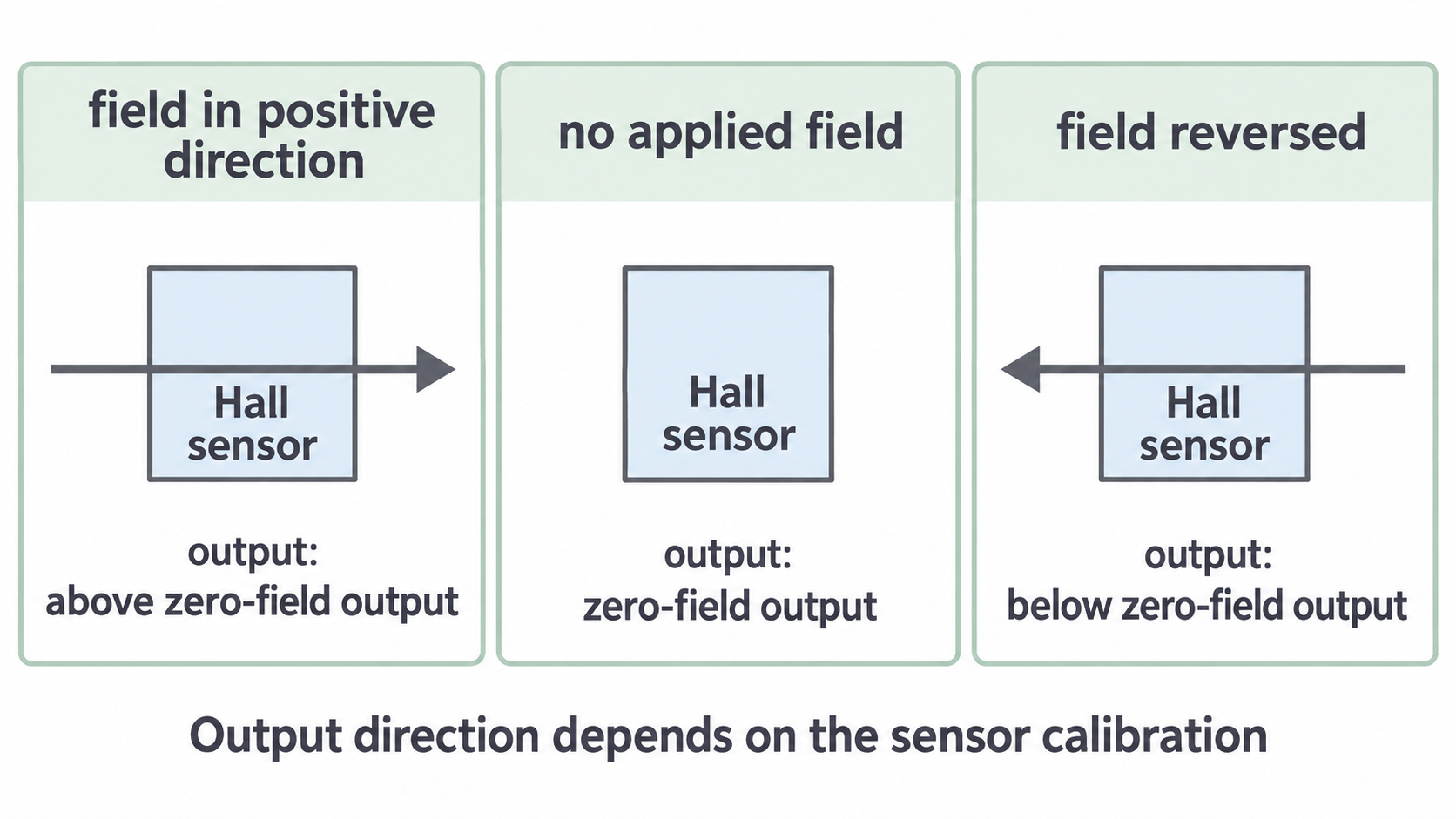
The zero-field output of a packaged sensor need not be . For example, a device may output at zero field, for one field direction and for the opposite direction. The signal reverses about ; the supply-referenced voltage has not become negative.
A Hall switch includes electronics that change between high and low outputs when magnetic thresholds are crossed. It is useful for counting passes. Do not treat every packaged Hall device as a zero-centred linear voltmeter or assume that every device has the same north/south polarity. Use its calibration or the stated input–output rule.
Monitoring orientation with a calibrated field
The attitude of an object means its orientation. A Hall sensor can monitor orientation because rotation changes the magnetic field component along its sensitive axis. Position sensing is a related application, but position and attitude are not the same quantity.
One arrangement fixes a sensor to a rotating object in a steady magnetic field. Another fixes a magnet to a hinged or rotating object and places the sensor nearby. Measure the output at known angles to create a calibration, keeping the sensor–magnet geometry fixed. Then use the output to infer angle over a range in which the calibration is unambiguous.
[DIAGRAM: asset_name: E.1.4 - Hall Effect Sensor - Diagram 2; asset_slug: E.1.4 - Hall Effect Sensor - Diagram 2; caption: Example Hall output calibrated against field angle; description: Illustrative calibration over 0–180 degrees for a fixed-magnitude field: output crosses a nonzero baseline at 90 degrees and reverses its change at 180 degrees.]
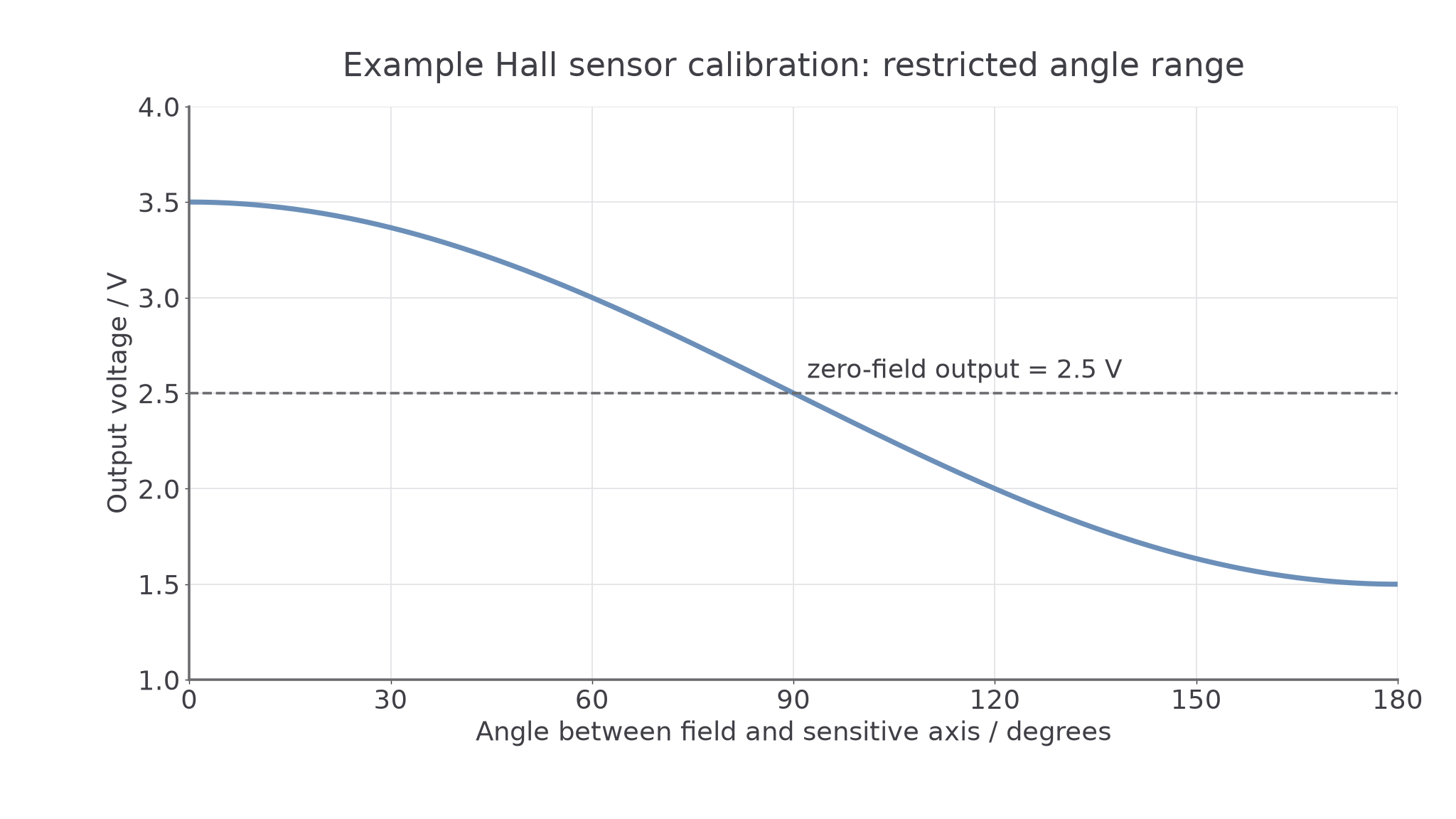
For the idealised calibration shown, the field is along the sensitive axis at , perpendicular to that axis at , and reversed at . The outputs are , and . Rotating a nearby magnet can also change field magnitude, so its actual angle calibration must be measured rather than assumed to follow this exact curve.
A single field component generally does not identify a unique angle throughout . Two orientations may give the same output. Restrict the allowed movement, use a second suitably oriented sensor or use other known position information to distinguish them. Nor does one field reading determine every component of a body's attitude.
For position sensing, a moving magnet changes the field at a fixed sensor. A calibration can relate output to displacement on a selected branch. If the output rises then falls as a magnet passes, the same output can occur on both sides; a unique position needs the branch to be known. Nearby magnetic material, an altered gap or an extra magnet may change the calibration.
Continue this lesson.
You’re previewing NovaLearn without an account. Create a free account to read the rest.
Create free account