D1 1.1 - Algorithms and their order
An algorithm is a precise set of instructions that turns inputs into outputs. You will follow instructions given in text or a flowchart, record changing values in a trace table, and use an algorithm's order to estimate how its running time grows.
Instructions, assignments and decisions
Must adding the first million positive integers require a million additions? One algorithm adds the integers one at a time. Another evaluates . They produce the same answer, but the amount of work grows very differently.
Algorithm
An algorithm is a finite, unambiguous sequence of instructions for carrying out a task. It specifies what to do, which decision to take, and when to stop. “Keep improving the answer” is not a complete algorithm unless “improving” and the stopping condition are defined.
An input supplies starting information; an output is a reported result. A variable stores a value that may change during the process. An instruction means “replace the stored value of by its current value plus one”. It is an assignment, not an equation to solve.
Execute instructions in order. With , , the instructions , then , give , then . The second instruction uses the updated , not its old value.
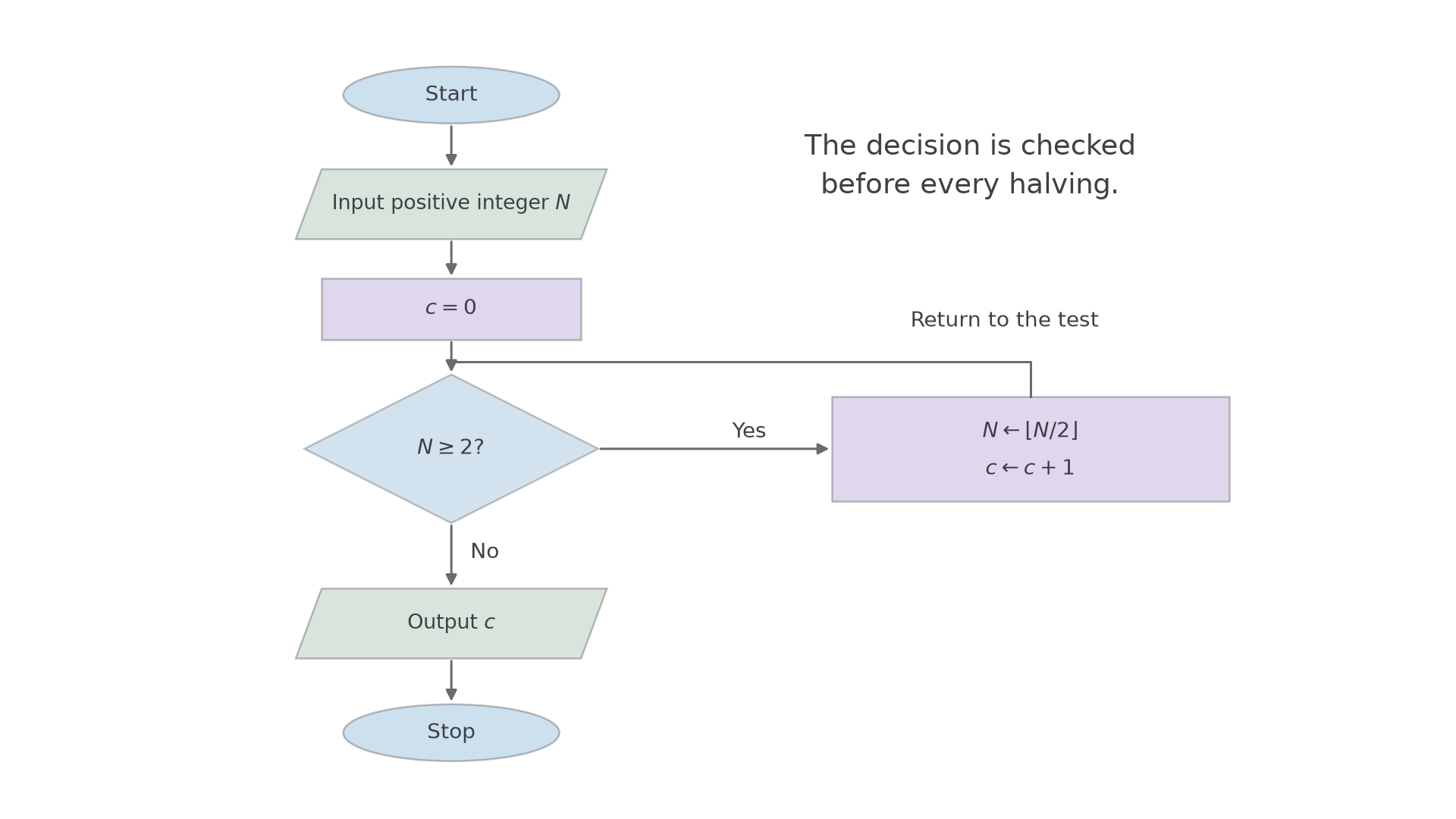
A flowchart expresses the same ideas graphically: an oval marks start or stop, a parallelogram input or output, a rectangle a process, and a diamond a decision with labelled branches. Arrows specify the order, including any return to an earlier step.
Key idea
Use the current stored values and follow the stated branch. Do not silently replace the given procedure by a different one that reaches the same final answer.
The order of assignments is the whole point of this short diagnostic.
Tracing a text algorithm
A trace table records the values actually produced as instructions are executed. Keep the entries in reading order so someone else can reconstruct the same process.
Consider this algorithm for a positive integer input :
- Set , .
- If , go to Step 5.
- Set .
- Set , then return to Step 2.
- Output and stop.
The test occurs before the addition. The row with is reached, but its value is not added.
Worked example 1: three additions
Question. Apply the algorithm with , showing its trace and output.
Plan. Record the initial state and the state after each completed update, then test whether another iteration is allowed.
| Stage | Result of | ||
|---|---|---|---|
| Initial state | No | ||
| After adding and increasing | No | ||
| After adding and increasing | No | ||
| After adding and increasing | Yes: stop |
Why include the last row? The algorithm only knows it is finished after the next test succeeds.
Answer. The output is .
Check. The additions were ; the value was tested but never added.
Worked example 2 changes only the input, from to . One further pass through the loop is now allowed.
Worked example 2: a larger stopping value
Question. Apply the same algorithm with .
Plan. Follow the same updates, continuing through the addition of .
| State | ||
|---|---|---|
| Initial | ||
| After first loop | ||
| After second loop | ||
| After third loop | ||
| After fourth loop |
At , the condition is true, so the algorithm outputs rather than adding again.
Why not stop at ? The condition is , not ; equality still permits an addition.
Answer. .
Check. .
If a question supplies a partly completed table, follow its headings and layout. A row after every update is acceptable, but updates must appear in execution order. Avoid rounding intermediate values unless the instructions require it.
Watch out
Wrong: change the stopping condition from to . Right: test the inequality exactly as written. One changed symbol can omit the final required iteration.
Use the same instructions with a new input.
Tracing decisions in a flowchart
At a decision diamond, take one branch and follow its arrow. A return arrow can cause the same instruction to be executed many times.
The flowchart below repeatedly halves an integer, discarding any fractional part, until it is below . The notation means the greatest integer not exceeding ; for example, .
[DIAGRAM: asset_name: A loop that counts repeated integer halvings; asset_slug: 9fm0-d1-161-halving-flowchart; caption: Test before halving, update the counter, then return to the decision; description: Start flows to input positive integer N, then c=0, then a decision N at least 2. The Yes branch goes to N=floor(N/2), then c=c+1, and loops to the decision. The No branch outputs c and stops. Standard flowchart shapes and clear Yes and No labels are used.]
Worked example 3: an even starting value
Question. Trace the flowchart for .
Plan. Record after each halving, returning to the decision each time.
| Stage | Decision | ||
|---|---|---|---|
| Initialise | Yes | ||
| First halving | Yes | ||
| Second halving | Yes | ||
| Third halving | Yes | ||
| Fourth halving | No |
Why does become ? The process uses the integer part, not rounding to the nearest integer.
Answer. The output is .
Check. Four halvings were performed. The final value fails .
Continue this lesson.
You’re previewing NovaLearn without an account. Create a free account to read the rest.
Create free account