NQ1, NQ2 - Spreadsheets and calculator iteration
Build and read a numerical calculation without losing its logic or its precision. You will copy spreadsheet formulae correctly, implement a supplied update and stopping test, generate iterates with a calculator's ANS facility, and distinguish stored values from displayed digits.
Copy a formula without moving the wrong cells
Three spreadsheet cells each display . Can their sum display ?
It can. A display may hide digits still used in the calculation. We will return to that puzzle after making sure the formulae point to the right cells.
You already know
Function notation tells you what to substitute into an expression. A recurrence gives a sequence through a starting value and an update rule. Brackets determine which operations happen together.
A cell such as is in column , row . A formula begins with . In spreadsheet entries, means multiplication and means division; use brackets for a numerator or denominator containing several terms.
Relative and absolute references
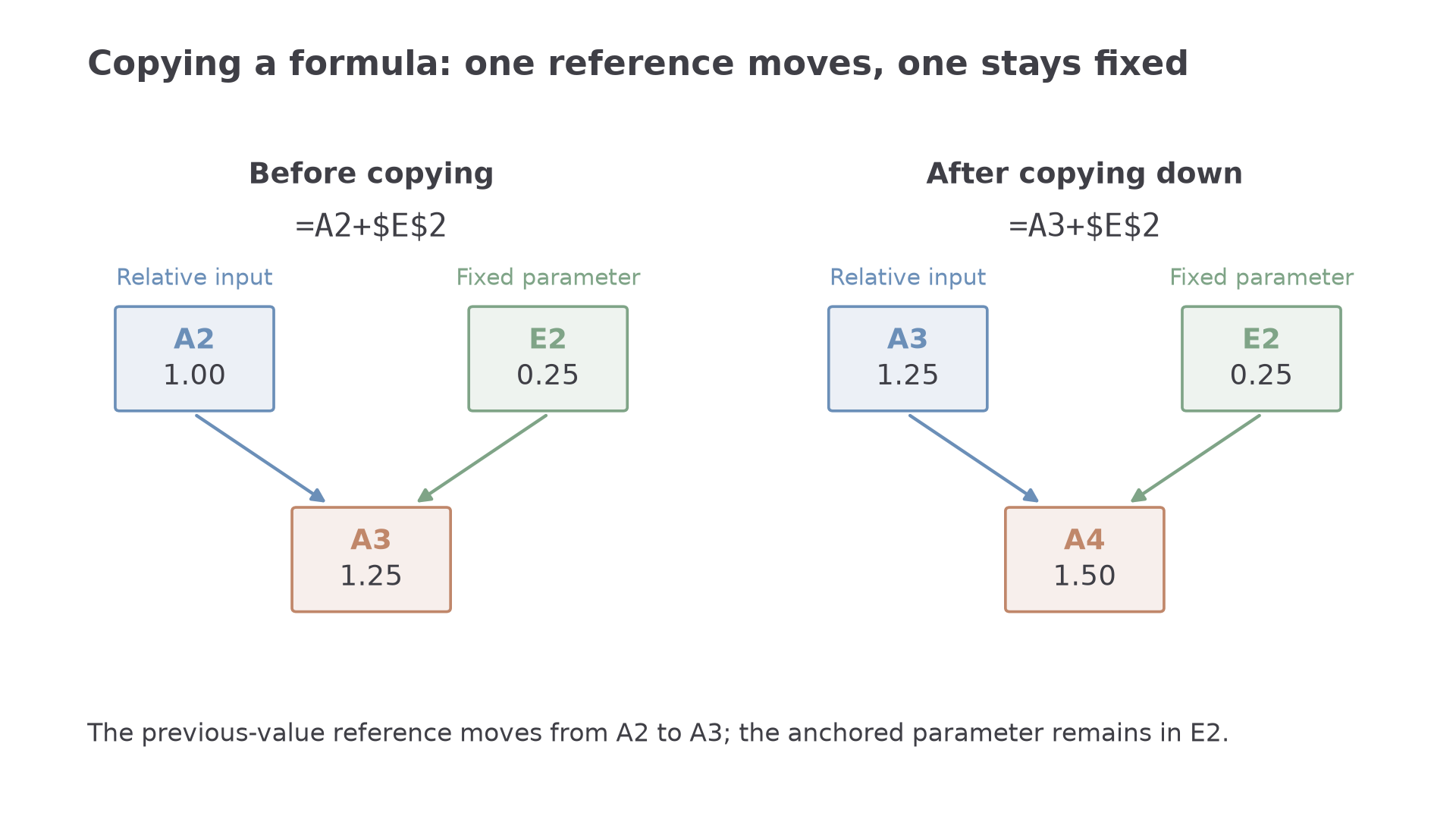
A relative reference, such as , moves with a copied formula. An absolute reference, such as \text{\A$2}\text{$A2}\text{A$2}$ fixes the row.
For a formula moved one cell, the references change as follows.
| Original reference | Copied one row down | Copied one column right |
|---|---|---|
| \text{\A$2}$ | \text{\A$2}$ | \text{\A$2}$ |
| \text{\A2}$ | \text{\A3}$ | \text{\A2}$ |
| \text{A\2}$ | \text{A\2}$ | \text{B\2}$ |
These spreadsheet conventions are not printed in the formula booklet. You need to recognise the references, not memorise any particular worksheet layout. Any familiar spreadsheet can be used during the course; calculator spreadsheet facilities are optional in the examination, rather than assumed.
[DIAGRAM: asset_name: A relative input and a fixed step; asset_slug: spreadsheet_references; caption: The previous value moves down a row while the fixed parameter stays in E2; description: Two panels compare formula A3=A2+2 before copying and A4=A3+2 after copying down. The relative input is blue, the fixed E2 parameter is sage and the destination is clay. Arrows show both input cells feeding the destination. E2 contains 0.25 in both panels.]
Worked example 1: a fixed step size
Question. A worksheet has , , , and . Cell contains =\text{A2}+\text{\E$2}\text{A5}\text{A3:A5}$.
Plan. Move the previous-value reference down each row, keeping the step-size cell fixed.
Why this step? The calculation needs the previous row's value but the same parameter every time.
Answer. The three formulae above give .
Check. Every consecutive difference is ; the entries in and are never used.
Change only the step-size reference from absolute to relative; leave every cell value unchanged.
Worked example 2: the parameter drifts
Question. Cell now contains , copied down to . Find the resulting formulae and values.
Plan. Move both relative references as the formula is copied.
Why this step? A formula can look correct in its first row but implement a different calculation after copying.
Answer. , with the cell formulae shown above.
Check. The first value agrees with the intended calculation, but the later differences reveal the moving parameter.
Absolute referencing is a choice about what must remain fixed, not a rule that every reference should have dollar signs.
Watch out
Wrong: anchor the previous value as well as the parameter, so every row recalculates from the original value. Right: keep the previous-value reference relative and anchor the fixed parameter.
Repair the formula in a new worksheet.
Translate an update and a stopping test into cells
A numerical procedure needs a starting value, an update, and instructions saying when to stop. A spreadsheet makes each step visible in a separate row.
In a new worksheet, store a parameter in and a tolerance in . Consider the supplied update
We are implementing this rule; the derivation and justification of particular equation-solving methods come later.
Successive-change test
For , define
The instruction “stop at the first ” can be implemented by a flag which is when the condition is true and otherwise.
This tests the change between iterates. It does not, by itself, bound the distance to an unknown answer.
Not in the formula booklet: learn it.
The spreadsheet function returns a non-negative magnitude. The function selects one of two outputs. These function names and the reference procedure are not supplied in the booklet.
| Cell | Entry | Meaning |
|---|---|---|
| Starting index | ||
| Starting value | ||
| Increase the index | ||
| =(\text{B2}+\text{\F$2})/2$ | Apply the supplied update | |
| Magnitude of the latest change | ||
| =\operatorname{IF}(\text{C3}<\text{\F$3},1,0)$ | Stop flag |
Copy row down. No change is defined in the starting row, because it has no previous iterate. The first flag of identifies the first row satisfying the supplied rule.
Worked example 3: the first stop flag
Question. Use , , and . Find the first iterate meeting .
Plan. Apply the update, calculate the magnitude of each change, and stop at the first true condition.
Why this step? The test uses the change just calculated, not the value of itself.
Answer. First stop at , with ; this is spreadsheet row .
Check. , whereas the preceding change does not pass.
Change only the tolerance from to . The iterates stay the same, but the stop flag changes.
Worked example 4: a stricter tolerance
Question. With and , find the first iterate meeting .
Plan. Retain the update values and continue until the smaller threshold is crossed.
Why this step? A smaller tolerance changes the stopping decision, not the recurrence or the values already calculated.
Answer. , , in spreadsheet row .
Check. , so this is the first passing row.
An formula must follow the given boundary convention. Replacing by changes the decision when a change equals the tolerance.
Read derived output columns through their formulae too. Here would give , the ratio of two successive change magnitudes. Later lessons use such output to discuss convergence and order, with the justification appropriate to the method.
Continue this lesson.
You’re previewing NovaLearn without an account. Create a free account to read the rest.
Create free account