AA1–AA3 - Using and adapting algorithms
An algorithm turns a task into instructions precise enough to follow without guesswork. You will read written instructions, pseudocode and flowcharts, trace changing variables, and repair or adapt a procedure so that it produces the intended output and stops.
Inputs, variables and a finite procedure
A procedure announces as a number and as its square. Every multiplication it performed was correct. How can instructions create that wrong pairing without any arithmetic mistake?
You already know
An inequality such as is either true or false for given values. A sequence of calculations must use the current values of its variables, and changing the order of operations can change the result.
Think of an algorithm as instructions for someone who follows exactly what is written. “Keep improving the answer” is not enough: improve it how, and when should the process stop?
Algorithm and state
An algorithm is a finite sequence of operations for carrying out a procedure or solving a problem. Finite means that the procedure terminates for its permitted inputs.
The input is the supplied information. Variables store values that may change; their current values and the current instruction form the state. Initialisation sets their starting values. Output is the information the procedure reports.
An algorithm can be the basis for a computer program, but does not have to be written in a programming language. Written English, a flowchart and pseudocode can describe the same procedure. Pseudocode is a clear notation for instructions; no particular programming-language syntax is needed here.
Assignment is not an equation to solve. “Let ” means replace the stored value of by its old value plus . If , it becomes . Later instructions use , not the old . Similarly, “let , then let ” usually does not swap two values: the original value of has already been overwritten.
A loop repeats a block of instructions. A pass is one traversal of the specified block or list. A finite written set of instructions can still fail to define a terminating algorithm: “increase , then return to the same instruction forever” has no stopping rule. State the permitted input domain and check that every allowed case can reach Stop.
Key idea
Follow the actual instruction and the current state. Do not silently perform the calculation you think the writer intended, and do not treat sequential assignments as simultaneous ones.
These algorithm and assignment conventions are not in the formula booklet. Clear labels, conditions and arrows make the intended next step unambiguous.
Trace the same procedure in different formats
Suppose the task is to find the smallest non-negative integer whose square is at least a non-negative integer input . One method tries successive integers, stopping as soon as the square reaches the threshold.
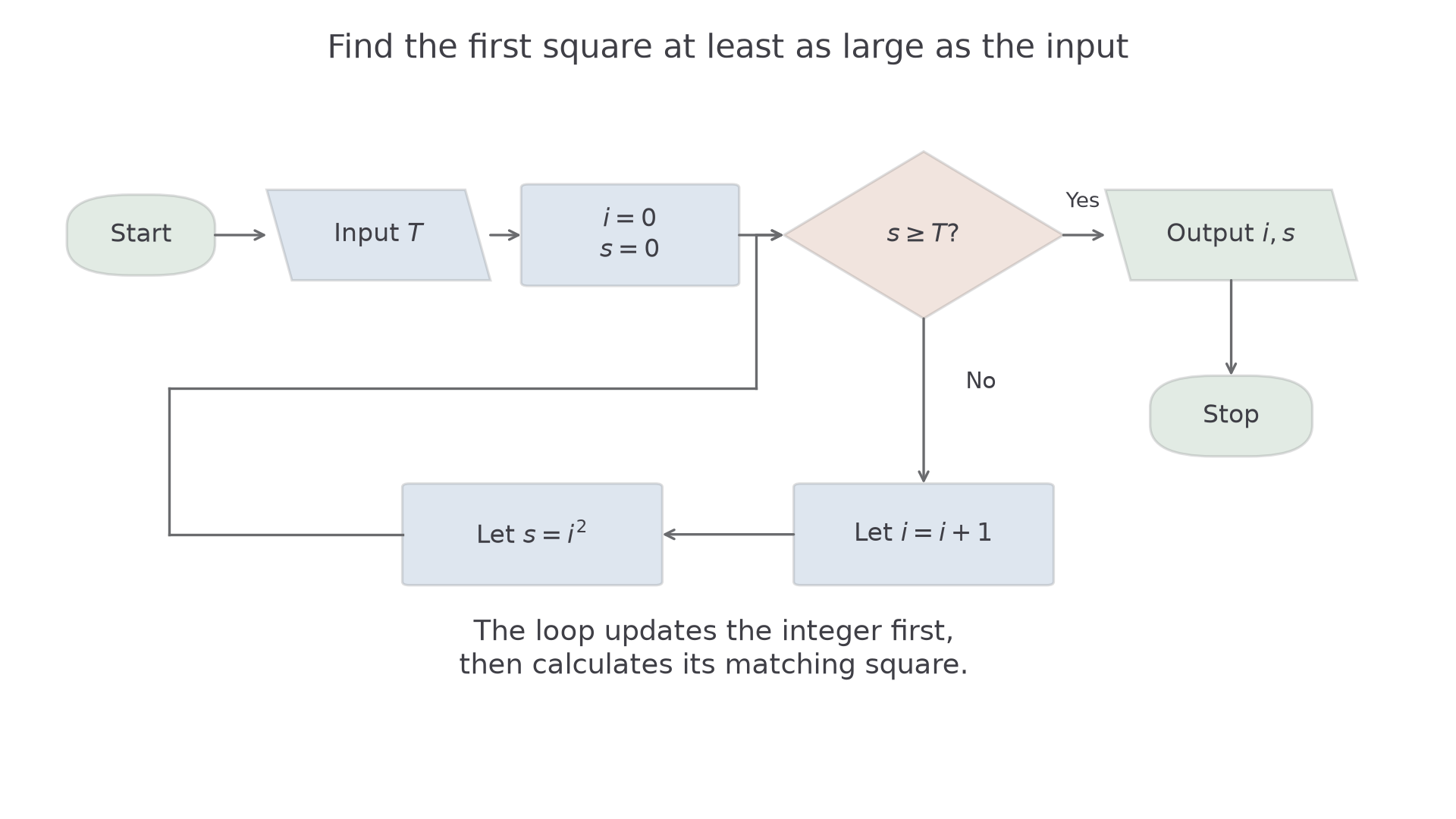
Written in English: start with and . While , increase by one and then replace by . When the condition is false, output and stop.
| Line | Pseudocode instruction |
|---|---|
| Input the non-negative integer | |
| Let | |
| If , go to line | |
| Let | |
| Let | |
| Go to line | |
| Output | |
| Stop |
The flowchart expresses exactly the same instructions. A decision diamond has labelled exits; its test is performed using the values at the moment the arrow reaches it.
[DIAGRAM: asset_name: A square-threshold flowchart; asset_slug: h645_b109_square_flow; caption: Increment i before calculating its new square; description: A flowchart begins with Start, inputs a non-negative integer T, initialises i and s to zero, and asks whether s is at least T. The Yes branch outputs i and s and stops. The No branch first replaces i by i plus one, then replaces s by i squared, and loops back to the decision. Input and output use parallelograms, assignments rectangles, and the test a diamond.]
Trace table
A trace table records variable values as the instructions are executed. State when each row is recorded, such as after initialisation and after each completed loop pass. If the question asks for every change, include intermediate assignment states too.
Keeping a column for the next test helps prevent an extra loop after the stopping condition has already been met.
Worked example 1: reaching a threshold between squares
Question. Trace the square-threshold algorithm for , recording the state after initialisation and after each completed loop pass. Give the output.
Plan. Update before , then use the new square to decide whether to repeat.
| Completed passes | Is ? | ||
|---|---|---|---|
| Yes | |||
| Yes | |||
| Yes | |||
| Yes | |||
| No |
For example, the fourth pass changes from to , then calculates .
Why this step? The square must use the updated integer; keeping the old integer would put one step behind.
Answer. The output is .
Check. , so is the smallest permitted integer reaching the threshold.
Change only the input to an exact square. The equality in the stopping test now matters.
Worked example 2: stopping exactly at the boundary
Question. Trace the same algorithm for .
Plan. Use the same updates and stop when , including equality.
| Completed passes | Is ? | ||
|---|---|---|---|
| Yes | |||
| Yes | |||
| Yes | |||
| Yes | |||
| No |
Why this step? “At least” includes equality, so reaching is enough. A test that continues while would solve a different task.
Answer. The output is again .
Check. The previous square is below , and meets the target exactly. For the boundary input , the initial state would already meet the target, so there would be no loop passes.
Continue this lesson.
You’re previewing NovaLearn without an account. Create a free account to read the rest.
Create free account