7.03a–7.03d - Defining, tracing and timing algorithms
An algorithm turns a problem into instructions that another person or a computer can follow. You will recognise its essential properties, trace and adapt short instructions, judge their uses and limitations, and estimate how running time grows when the problem gets larger.
What makes an algorithm
A machine takes seconds to process records. How long should it need for records: three times as long, nine times as long, or something else? You cannot answer from the record count alone. You need to know what the instructions do.
Start with a smaller problem: find the largest number in the list . Keep as the current largest; compare it with , then , then , updating when a larger value appears. The successive current largest values are . The final output is .
Algorithm
An algorithm is a finite sequence of unambiguous instructions with an input and an output. It is deterministic: a given input, together with the stated rules, determines what happens at every step. It must finish after finitely many steps for every permitted input.
The input above is the list; the output is its largest value. “Find a large-looking number” is not a complete instruction: two people could make different choices. “Compare the next entry with the current largest and replace the current largest if it is smaller” specifies the choice.
A counter records how many times something has happened. For a list of length , a counter can start at , identify the next position to inspect and increase by each time. A stopping condition tells the procedure when to finish: stop when that counter exceeds . These meanings are not in the formula booklet: learn them.
A finite-looking description need not describe a terminating process. “Start at , add repeatedly, stop at ” never stops: it visits only odd integers. Changing the stopping condition to “stop when the value is at least ” makes it finish at . The permitted input and the exact stopping test both matter.
Key idea
An algorithm needs a definite next action and a guaranteed finish, as well as a sensible answer when it finishes.
Check the stopping condition rather than judging the instructions by their length.
Tracing assignments and repeated steps
A trace follows the instructions in order, recording values as they change instead of trying to guess the final answer.
The assignment means “replace the stored value of by its old value plus ”. It is an instruction, not an equation claiming that a number equals itself plus . Later lines use the updated value.
INT and ABS
is the non-negative magnitude of . For non-negative , gives the integer part, discarding the fractional part. For example, and . Every use of in this lesson has a non-negative argument.
These function meanings are not in the formula booklet: learn them. The following algorithm adds the decimal digits of an integer input . It handles a negative input by first taking its magnitude.
| Step | Instruction |
|---|---|
| Input an integer ; set and | |
| If , output and stop | |
| Set | |
| Set , then | |
| Set , then return to step |
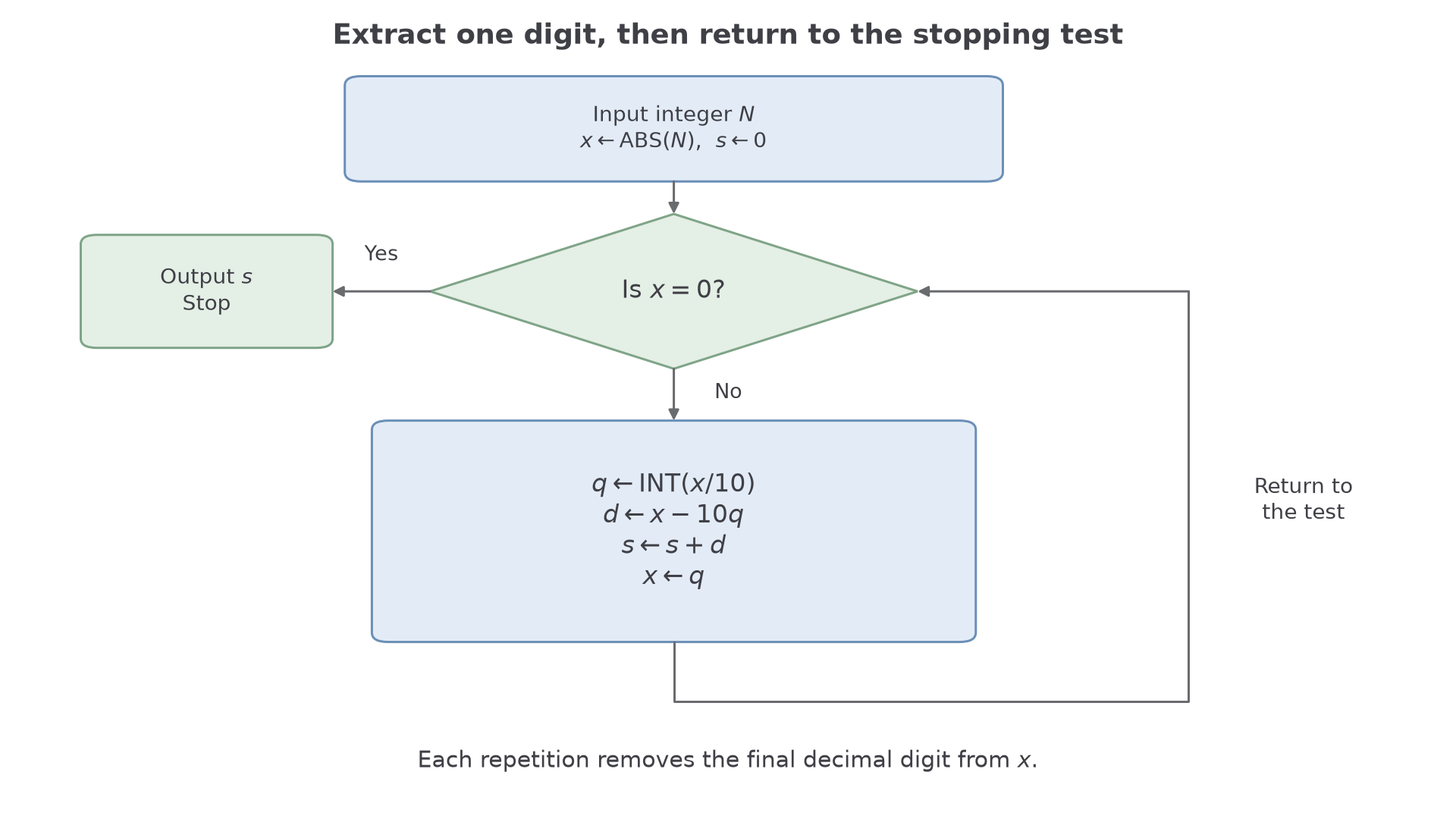
For instance, : keeps the earlier digits and extracts the final digit. Replacing by removes that digit, so positive decreases until it becomes . The flow diagram presents exactly the same instructions; a decision diamond has separate yes and no exits.
[DIAGRAM: asset_name: A digit sum algorithm; asset_slug: h245_7_03_digit_flow; caption: The loop extracts one final digit, adds it to the total and removes it before testing again; description: A flow diagram begins with integer input N and initialisation x equals ABS(N), s equals zero. A diamond asks whether x equals zero. The yes branch outputs s and stops. The no branch sets q to INT(x divided by ten), d to x minus ten q, s to s plus d, and x to q, then returns to the decision diamond. Arrows show the order of assignments.]
Worked example 1: a digit-by-digit trace
Question. Trace the algorithm for , and state its output.
Plan. Record at the start of each loop and use it to calculate , and the updated total .
| Starting | Updated | ||
|---|---|---|---|
After the third row, , so the next stopping test is true.
Why this step? Calculate before replacing by ; otherwise the digit being removed is lost before you use it.
Answer. The output is , the digit sum of .
Check. .
Worked example 2 changes only the input to a negative integer containing a zero. The absolute value handles the sign; the zero digit still requires a loop.
Worked example 2: a zero digit
Question. Trace the algorithm for , and state its output.
Plan. Initialise , then apply the same assignments in their stated order.
| Starting | Updated | ||
|---|---|---|---|
The next starting value is , so the algorithm stops.
Why this step? A zero digit leaves unchanged but still removes one decimal place from . An unchanged total is not the stopping condition.
Answer. The output is .
Check. ; the negative sign is not a digit. For input , step would immediately output , which is also correct.
The same variable can have several values during a trace, but each row must correspond to the same point in the loop.
Watch out
Wrong: stop when does not change. A zero digit can leave unchanged while earlier digits remain. Right: test the specified condition .
For the next input, retain the row containing its zero digit.
Adapting instructions for a new output
To alter an algorithm, identify which instructions extract information, which combine it and which guarantee that the process stops.
In the digit algorithm, and extract a digit, combines it with the total, and makes progress towards stopping. Changing the output task need not change all three jobs.
Worked example 3: adding squared digits
Question. Adapt the digit-sum algorithm to output the sum of the squares of the digits of an integer. Trace the altered total for input .
Plan. Keep the digit extraction and stopping condition; replace the accumulation instruction by .
Why this step? Squaring before adding gives a sum of squares; squaring the final total would give the square of a sum instead.
Answer. Replace by . The output is .
Check. , whereas .
Worked example 4 changes only the quantity accumulated: count digits rather than adding their squares. A counter increases once per extracted digit, regardless of its value.
Worked example 4: counting digits
Question. Adapt the algorithm to output the number of decimal digits of , including the convention that has one digit. Trace it for .
Plan. Deal with zero separately, then count one removal per loop for a non-zero input.
Use these complete instructions:
- Input an integer ; set .
- If , output and stop. Otherwise set .
- Set , then .
- If , return to step ; otherwise output and stop.
Why this step? Initialising correctly counts the removals for non-zero inputs, but zero itself has no removals. Its one-digit representation needs the separate branch.
Answer. The instructions above output for , and for .
Check. A one-digit non-zero input reaches after one removal, so its output is , as required.
Continue this lesson.
You’re previewing NovaLearn without an account. Create a free account to read the rest.
Create free account