D1 4.1, D1 4.2 - Activity networks
D1 4.1 turns a project's immediate-predecessor table into an activity-on-arc network, including dummy activities when needed. D1 4.2 reads the network backwards to recover its table. Both directions let you check that the model imposes exactly the intended dependencies.
Immediate-predecessor tables
If a final inspection depends on assembly, and assembly depends on cutting, must the table list both assembly and cutting before inspection? Listing the immediate dependencies is enough; the earlier ones are already enforced by the chain.
Precedence and immediate predecessors
A precedence constraint says that an activity must finish before another can start. An immediate predecessor is a directly required preceding activity, excluding earlier activities whose completion is already forced through another listed predecessor. A dash means no predecessor: the activity may start when the project starts.
All activities in a listed set must finish, not just one of them. Being available to start does not mean starting is compulsory at that moment. No resource limitation is assumed unless supplied.
Worked example 1: direct and inherited requirements
Activities may start immediately. requires . requires . requires . Write the immediate-predecessor table.
Plan. Enter direct requirements and leave inherited earlier activities out.
| Activity | Immediate predecessors |
|---|---|
| — | |
| — | |
Answer. The table above. In particular 's row is , not .
Check. Completing guarantees has finished; completing guarantees both have finished. Nothing from the full history has been lost.
Change only one requirement: must now wait for as well. This introduces an inherited dependency which changes the immediate table.
Worked example 2: removing redundant entries
Use the revised requirements, keeping dependent on completion of .
Plan. Follow the new -before- link before deciding which table entries are immediate.
already requires , so 's immediate predecessors are , with inherited through . Once finishes, has finished too, so 's only immediate predecessor is now .
Answer. Rows .
Check. Both versions still force before . The revised version additionally forces before , exactly the one new requirement.
The table represents a partial order. Independent activities may run together; their alphabetical order does not add precedence.
Activity-on-arc diagrams
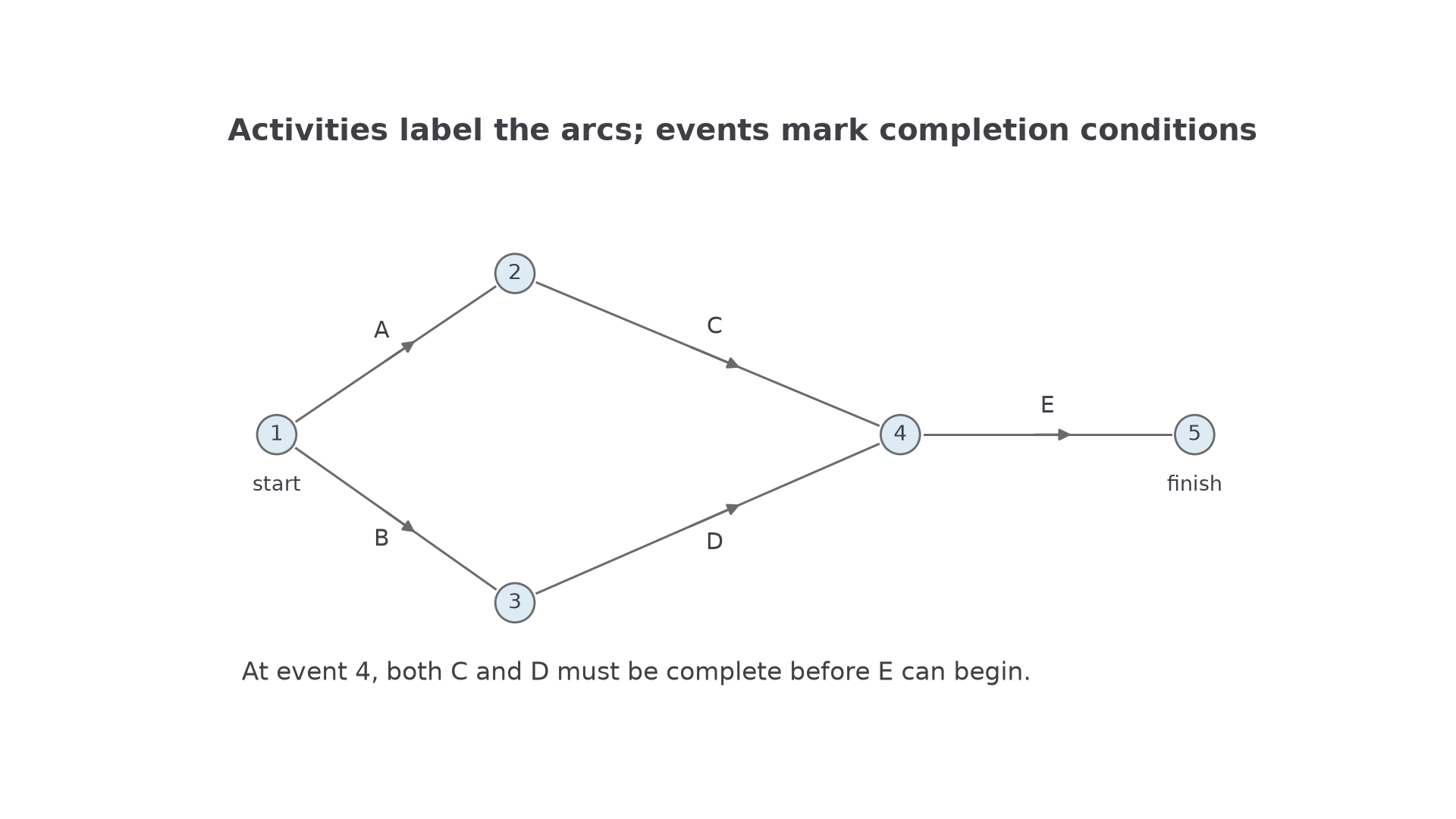
In an activity-on-arc diagram the work is represented by arrows, while the vertices represent events marking completion conditions.
Activity on arc
An activity is a labelled directed arc. An event is a vertex: it occurs only when all incoming activities have finished. Every outgoing activity must wait for that event. The event itself takes no time.
Use one start and one finish event for the whole project. Draw every activity once, with a clear arrow; place the arrowhead away from the event circle so its direction remains readable. Number events consistently in a forward order. The network must have no directed cycle: a cycle would require an activity to finish before it could begin. Different valid drawings can represent the same table.
To construct a network, place independent starting activities first. Split outgoing arcs when activities share a prerequisite. Merge arcs only when all their completions are required for every outgoing activity. Finally connect all terminal work to the finish. The diagram describes dependency, not the time spent or the number of workers.
[DIAGRAM: asset_name: Activities are arcs, events are vertices; asset_slug: activity-on-arc; caption: E starts only after both C and D have finished.; description: One start event 1, A from 1 to 2, B from 1 to 3, C from 2 to 4, D from 3 to 4, E from 4 to 5. Activities appear on directed arcs, with one finish at 5.]
Worked example 3: joining two branches
Represent as an activity-on-arc network.
Plan. Build the independent branches and merge only at 's start.
Use arcs
These are the arcs in the diagram. finishes at event , making available; finishes at event , making available. Event waits for both .
Answer. The five listed arcs, with start and finish .
Check. does not wait for , and does not wait for . Only has both branches as prerequisites.
Change only 's predecessors from to . remains part of the project, but must no longer delay 's start.
Worked example 4: an independent terminal activity
Construct the revised network.
Plan. Keep 's start after , and move 's finish to the project finish.
Use
Answer. Event now depends only on ; finish event waits for both .
Check. can start while is still in progress, but the project cannot finish until has finished. Leaving would incorrectly retain -before-.
An arc list is also a precise way to specify a network: its activity label and start/end event numbers identify each connection.
Continue this lesson.
You’re previewing NovaLearn without an account. Create a free account to read the rest.
Create free account