D1 1.2 - Sorting lists
Sort numerical lists using bubble sort and quicksort, showing the intermediate states that distinguish the two algorithms. You will track each pivot and sublist and recognise when the specified algorithm has finished.
Bubble-sort passes
Can a list look sorted before a sorting algorithm has finished? Yes: the algorithm still needs a reason to stop. First we will see what one complete pass actually does.
For ascending order, compare the first two adjacent items. If the left item is larger, swap them; otherwise leave them. Move one place right and compare the next adjacent pair, using the list as it now stands. Continue to the right-hand end. This is one pass, not the whole sort.
Bubble sort
Bubble sort repeatedly compares adjacent items and swaps a pair if it is in the wrong order. Work from left to right unless told otherwise. For descending order, swap when the left item is smaller.
In an ascending pass, the larger item of each compared pair moves right. The largest item therefore reaches the right-hand end on the first pass. In this lesson, every pass still compares all adjacent positions, from left to right, until a whole pass makes no swaps.
Worked example 1: one ascending pass
Carry out the first bubble-sort pass on , into ascending order.
Plan. Compare the three adjacent pairs from left to right, carrying each swap into the next comparison.
Answer. After pass 1: , with three swaps.
Check. The largest value, , is now last. The other values need not yet be sorted: still precedes .
Change only the required direction. The same comparisons are made, but the swap condition reverses.
Worked example 2: one descending pass
Carry out the first bubble-sort pass on , into descending order.
Plan. Move left to right, swapping only when the left value is smaller.
| Pair compared | Decision | Current list |
|---|---|---|
| No swap | ||
| Swap | ||
| No swap |
Answer. After pass 1: , with one swap.
Check. The smallest value, , is at the right-hand end, as a descending pass guarantees. The list happens already to be sorted, but the stopping test comes later.
The comparison always concerns adjacent positions in the updated list.
Watch out
Do not compare only the original pairs . After a swap, a different item may occupy the next left-hand position.
Try one pass, without silently finishing the sort by inspection.
Quicksort with the middle pivot
Quicksort moves items around a selected pivot rather than exchanging adjacent pairs.
Pivot and partition
A pivot is the selected item used to split a list. In ascending quicksort, write the items smaller than the pivot, then the pivot, then the remaining items. Keep the original relative order within each side. This splitting is a partition.
Choose the middle item using the right-hand middle position for an even-length list. Do not sort before choosing it. The partition puts this pivot in a final sorted position, because every item to its left is smaller and every item to its right is at least as large. The two sides may still be unsorted.
For repeated values, another item equal to the pivot can go into either side. Here we put equal items on the right: the ascending groups are “less than” and “greater than or equal to”; for descending order they are “greater than” and “less than or equal to”. Keep each occurrence and preserve order within each side. Our examples use distinct values so the partitions are unambiguous.
[DIAGRAM: asset_name: Quicksort partitions around the middle item; asset_slug: quicksort-partition; caption: The middle position chooses 4, then a stable partition leaves two unsorted sublists.; description: The seven-item list 6 2 7 4 1 5 3 has its fourth-position item 4 highlighted. Under it, the partition is 2 1 3, boxed pivot 4, 6 7 5. The left group is labelled less than 4 and the right group greater than 4.]
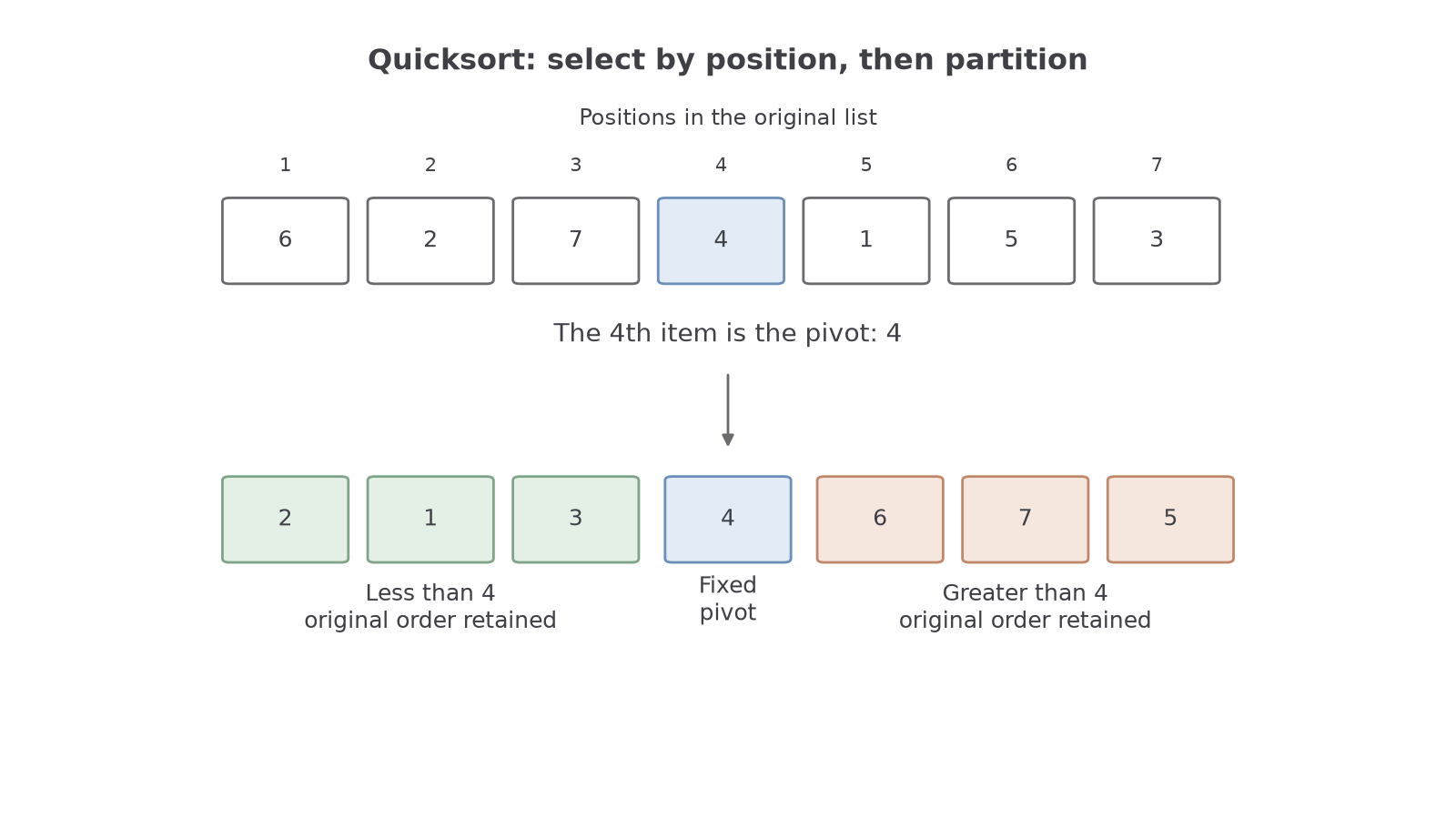
Worked example 3: an ascending partition
Show the first quicksort pass for , into ascending order.
Plan. Find the fourth item, then scan the original list in order to form each side.
Answer. The first partition is .
Check. All three values on the left are less than ; all three on the right exceed it. The values retain their original relative order.
Change only the required direction. The pivot is chosen in exactly the same way.
Worked example 4: a descending partition
Show the first quicksort pass for , into descending order.
Plan. Use pivot , putting larger items on its left and smaller items on its right.
Answer. The first partition is .
Check. There are three larger values and three smaller values, so is again in its final fourth position. Each side preserves its original order.
Choosing a pivot and putting its two sides into order are different operations.
Watch out
Writing as the first pass hides extra sorting. Quicksort initially produces , then processes those sublists.
This time the list has an even number of items.
Continue this lesson.
You’re previewing NovaLearn without an account. Create a free account to read the rest.
Create free account