G7 - Enlargement and scale factors
Construct a similar copy by scaling every position from one centre. You will enlarge shapes with whole-number and fractional scale factors and recover a centre and scale factor from a shape and its image. A separate Higher part extends the same idea to negative scale factors.
Enlarging from a centre
Can an enlargement make a triangle smaller? The name sounds as though it cannot, but the scale factor decides. First see what happens when that factor is .
You already know
Similar triangles have equal corresponding angles and proportional corresponding sides. A reflection, rotation or translation keeps a shape's size as well. A multiplier tells you how many times one quantity is another.
Take a centre and a point . To enlarge by scale factor , travel from towards , but go twice as far: . Apply that same rule to every vertex of the shape.
Enlargement and scale factor
An enlargement with centre and positive scale factor puts each image point on the ray from through its original point, with . Corresponding lengths are multiplied by , and corresponding angles remain equal. The image is similar to the original.
For , the image is larger. For , every point stays where it is and the image is congruent. A scale factor of collapses everything to the centre, so it does not produce a similar triangle.
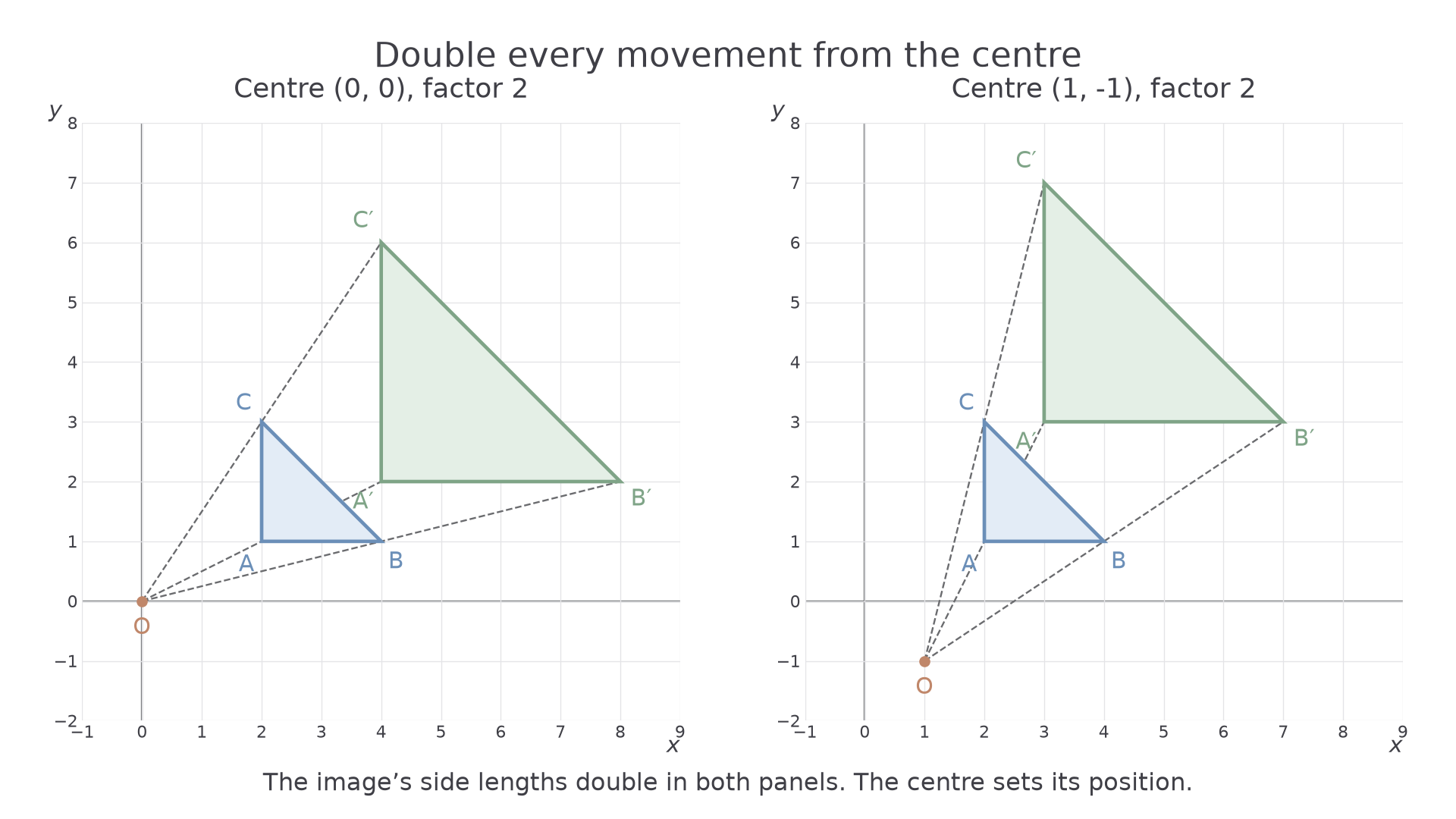
[DIAGRAM: asset_name: The centre is the starting point for every scaled movement; asset_slug: aqa8300_g07_positive_enlargement; caption: Scale the movements from the centre rather than automatically doubling coordinates; description: Two coordinate-grid panels show triangle A2comma1 B4comma1 C2comma3 enlarged by scale factor 2. Left the centre is 0comma0 and images are 4comma2 8comma2 4comma6. Right the centre is 1comma minus1 and images are 3comma3 7comma3 3comma7. Rays pass through corresponding vertices and the centre.]
Enlargement from a centre
For centre and positive scale factor ,
Subtract the centre, multiply the relative movement by , then add the centre back. When the centre is the origin, this simplifies to .
Not on the formulae sheet: learn it.
For a construction, draw a ray from the centre through each vertex. Mark the image the required number of times as far from the centre, then join the image vertices in the same order.
Worked example 1: doubling from the origin
Question. Enlarge triangle , , by scale factor , centre . Write down the image coordinates. Non-calculator.
Plan. Double each horizontal and vertical movement from the origin.
Why this step? Coordinates already measure movements from the origin, so no adjustment of the centre is needed.
Answer. , , .
Check. and ; and . Both lengths doubled.
Change only the centre to . The scale factor and original triangle stay the same.
Worked example 2: doubling from a different centre
Question. Enlarge , , by scale factor , centre . Non-calculator.
Plan. Work from the stated centre rather than from the origin.
Why this step? Doubling the coordinates would use the origin as centre and place the whole image incorrectly.
Answer. , , .
Check. From , is right and up. Its image is right and up, exactly twice as far in the same direction.
The centre can be outside the shape, inside it or at one of its vertices. If a vertex is the centre, that vertex stays fixed while the others move.
Watch out
Wrong: scale factor means add to every coordinate. Right: multiply each movement from the centre by . For centre , goes to , not .
Use the same centre-based method with a new whole-number factor.
Fractional scale factors
For a positive factor below , the image lies between the centre and the original point. It is a smaller, similar copy.
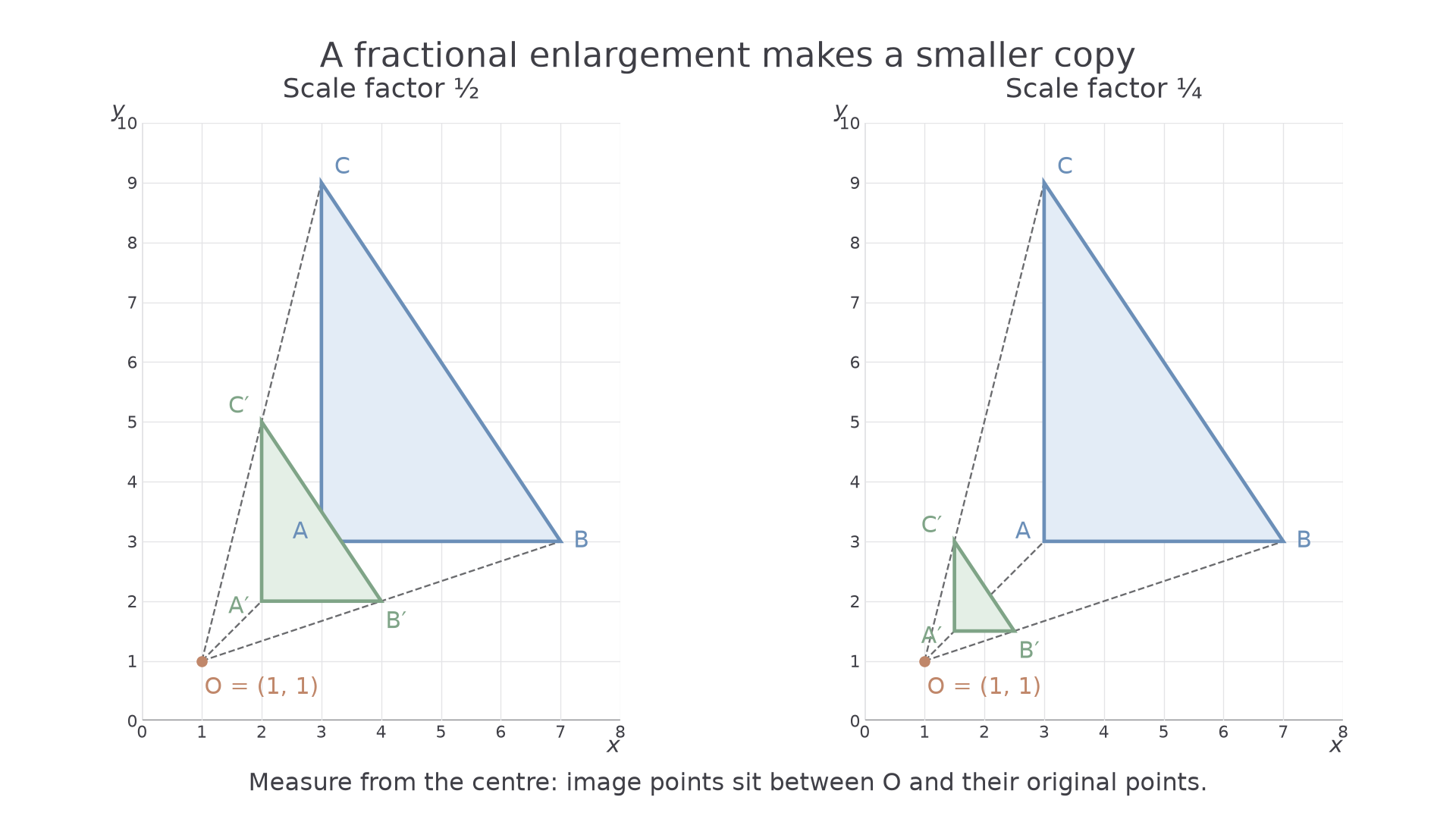
If the factor is , each image point is halfway from the centre to its original. For , it is one quarter of the way. The word enlargement still names the transformation, even though the image has shrunk.
Positive fractional enlargement
For ,
The image lies on the same side of the centre as its original. Corresponding angles stay equal.
Not on the formulae sheet: learn it.
There is no new construction rule. Use the same rays, but mark a fraction of each distance from the centre.
[DIAGRAM: asset_name: Half and quarter scale copies lie closer to the centre; asset_slug: aqa8300_g07_fractional_enlargement; caption: Factors one half and one quarter make smaller similar triangles on the same rays; description: Two coordinate-grid panels show triangle A3comma3 B7comma3 C3comma9 and centre 1comma1. Left the factor is one half and image vertices are 2comma2 4comma2 2comma5. Right the factor is one quarter and image vertices are 1.5comma1.5 2.5comma1.5 1.5comma3. Rays show that image points lie between the centre and original points.]
Worked example 3: halfway from the centre
Question. Enlarge , , by scale factor , centre . Non-calculator.
Plan. Halve each movement from , then put the centre back.
Why this step? Halving the distances from puts each image halfway along the correct ray.
Answer. , , .
Check. becomes ; becomes . Both are halved.
Change only the factor from to . Half-unit coordinates are valid positions on the grid.
Worked example 4: a quarter of the original movement
Question. Enlarge , , by scale factor , centre . Non-calculator.
Plan. Quarter each movement from the centre.
Why this step? A coordinate need not land on a grid intersection. Round neither the movement nor the image coordinate.
Answer. , , .
Check. The image's horizontal side is , one quarter of ; its vertical side is , one quarter of .
A nice consequence is that a positive enlargement can be undone by its reciprocal factor about the same centre. Multiplying a movement by , then by , returns the original movement. The centre must stay the same.
Watch out
Wrong: “A scale factor of means one quarter of the way from the original towards the centre.” That leaves three quarters of the original distance. Right: measure one quarter of the full distance from the centre.
The next factor makes each movement one third as large.
Finding the scale factor and centre
A full description of an enlargement needs both its scale factor and its centre. The factor explains the size; the centre explains the position.
Continue this lesson.
You’re previewing NovaLearn without an account. Create a free account to read the rest.
Create free account