5.2 - Enlargement and transformation descriptions
Enlarge shapes using positive scale factors, including fractions, and describe an enlargement completely. You will measure from a centre, construct images with or without a given centre, and distinguish the lengths that change from the angles that stay equal.
Centre and scale factor
If a triangle is enlarged by scale factor 2, do you simply double its coordinates? Try a point measured from . It is 1 right and 1 up from . Doubling that movement puts its image at , rather than . The centre matters as much as the factor.
You already know
Similar shapes have equal corresponding angles and corresponding lengths in one ratio. A coordinate pair gives a position; subtracting coordinates gives the movement from one point to another.
An enlargement measures every movement from the same fixed point. This determines where the image goes, as well as how big it is.
Enlargement
An enlargement with centre and positive scale factor maps each point to a point on the same ray from , with . The centre stays fixed. A complete description gives both the centre and scale factor.
If , the image is farther from the centre; if , every point is unchanged. The same ray condition matters: a positive factor keeps the image on the same side of the centre as the original point.
Enlargement from a centre
For centre , point and ,
Subtract the centre, scale the relative movement, then add the centre back. Not in either the Foundation or Higher formulae sheet: learn the method.
You can count horizontal and vertical steps instead of using the coordinate formula. Both methods measure from .
Worked example 1: an off-origin centre
Question. Enlarge , , by scale factor 2 about .
Plan. Double each movement from , then add back.
Why not double each coordinate? That would measure from the origin and use a different centre.
Answer. , , .
Check. , while . Every centre-to-image movement is twice its original.
Change only the centre to the origin. Keep the triangle and scale factor unchanged.
Worked example 2: when doubling coordinates works
Question. Enlarge the same triangle by scale factor 2 about .
Plan. The coordinates already measure from the centre, so double them.
Why is the shortcut valid now? Subtracting and adding the origin changes nothing.
Answer. , , .
Check. Corresponding sides again double, but these image positions differ from those in the first example.
The shape and factor determine size, while the centre determines placement. Check both when constructing an image.
Watch out
For centre , the line uses the wrong centre. Double the relative movement , then add the centre to obtain .
Change only the centre again.
Fractional scale factors
An enlargement can make a shape smaller. For , each image point lies between its centre and original point. For , it is the midpoint of the centre-to-point segment; for , it is one quarter of the way from the centre.
Key idea
A positive fractional scale factor shortens every centre-to-point movement. It does not move an image to the opposite side of the centre.
The fraction applies to the whole distance from the centre, not the gap between the original and its image. Use the same subtract-scale-add method as before. Fractional enlargement rules are not supplied in either tier's formulae sheet.
Worked example 3: a half-size image
Question. Enlarge , , by about .
Plan. Halve each movement from .
Why are the image points nearer ? Their distances from are half the originals.
Answer. , , .
Check. becomes , and becomes . Each image is the midpoint of its centre-to-object segment.
Change only the factor from to . Keep the centre and object unchanged.
Worked example 4: a quarter-size image
Question. Enlarge the same triangle by about .
Plan. Divide each centre-relative movement by 4.
Why can coordinates be fractional? A vertex can lie between grid lines; the scale factor still applies exactly.
Answer. , , .
Check. The two perpendicular sides now have lengths and 1, one quarter of 2 and 4.
The original half-size example and the factor-2 example are shown together below. Blue always denotes the object and sage the image.
[DIAGRAM: asset_slug: m085-positive-enlargements; caption: Positive scale factors 2 and one half measured from their centres; description: Two separate exact equal-unit coordinate panels. Left: centre C=(1,-1), A=(2,0), B=(4,0), D=(2,2), factor 2 gives A'=(3,1), B'=(7,1), D'=(3,5). Right: centre C=(2,2), A=(4,2), B=(6,2), D=(4,6), factor one half gives A'=(3,2), B'=(4,2), D'=(3,4). Dashed centre rays show images on the same side for both positive factors, blue objects and sage images.; file: positive-enlargements.png; recommended_method: matplotlib]
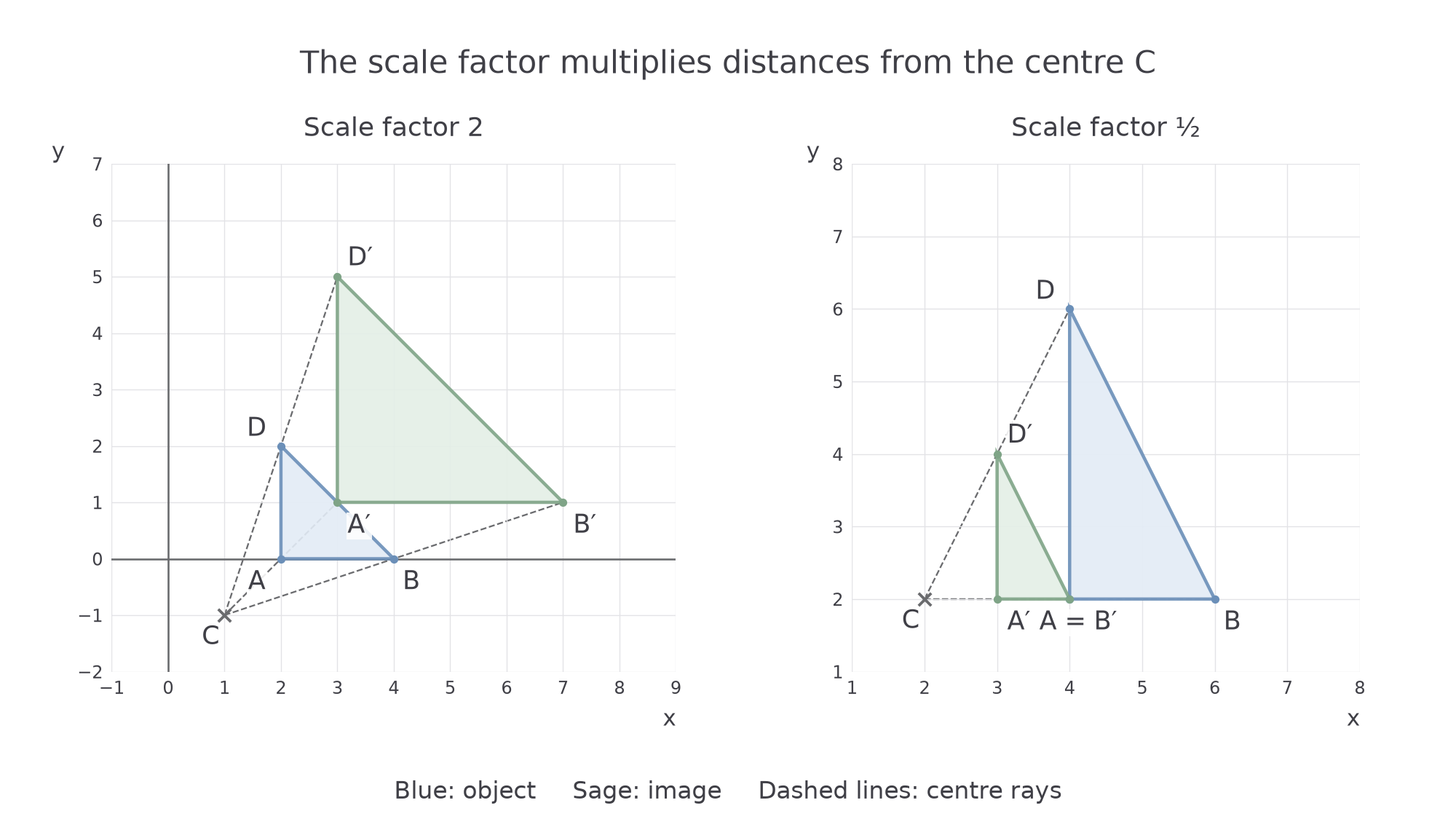
Here is a useful surprise: two successive half-size enlargements about the same centre give a quarter-size image. A relative movement becomes , then . Taking a midpoint twice does not return you to the original point.
Watch out
A half-scale image is not necessarily halfway to the origin. It is halfway from the given centre to the point. For example, enlarged by about gives .
Change only the factor again, using three quarters of each movement.
Drawing with or without a centre
When a centre is given, the image has one specified position. Draw a ray from the centre through each vertex. Measure the centre-to-vertex distance, multiply it by the positive scale factor, and mark the image on the same ray. Extend beyond the vertex if , or stop between centre and vertex if .
On an equal-unit grid, count horizontal and vertical steps instead of measuring sloping distances. For example, doubling 3 right and 2 up gives 6 right and 4 up from the centre. Mark every image vertex, label corresponding points and join them in the original order. Retain the rays so the placement can be checked.
Continue this lesson.
You’re previewing NovaLearn without an account. Create a free account to read the rest.
Create free account