1.8 - Rounding and estimation
A quick estimate can catch a misplaced decimal point before it costs you marks. You will round integers, decimals and significant figures, then use simple rounded values to check a calculation's size. You will also see why rounding too early can change an answer.
Rounding integers
A calculator result for is reported as . Does that look sensible? We will build a quick estimate that can answer without carrying out the original calculation exactly.
You already know
Place value tells you where a digit sits. The powers , and give tens, hundreds and thousands. Nearby multiples help you compare distances.
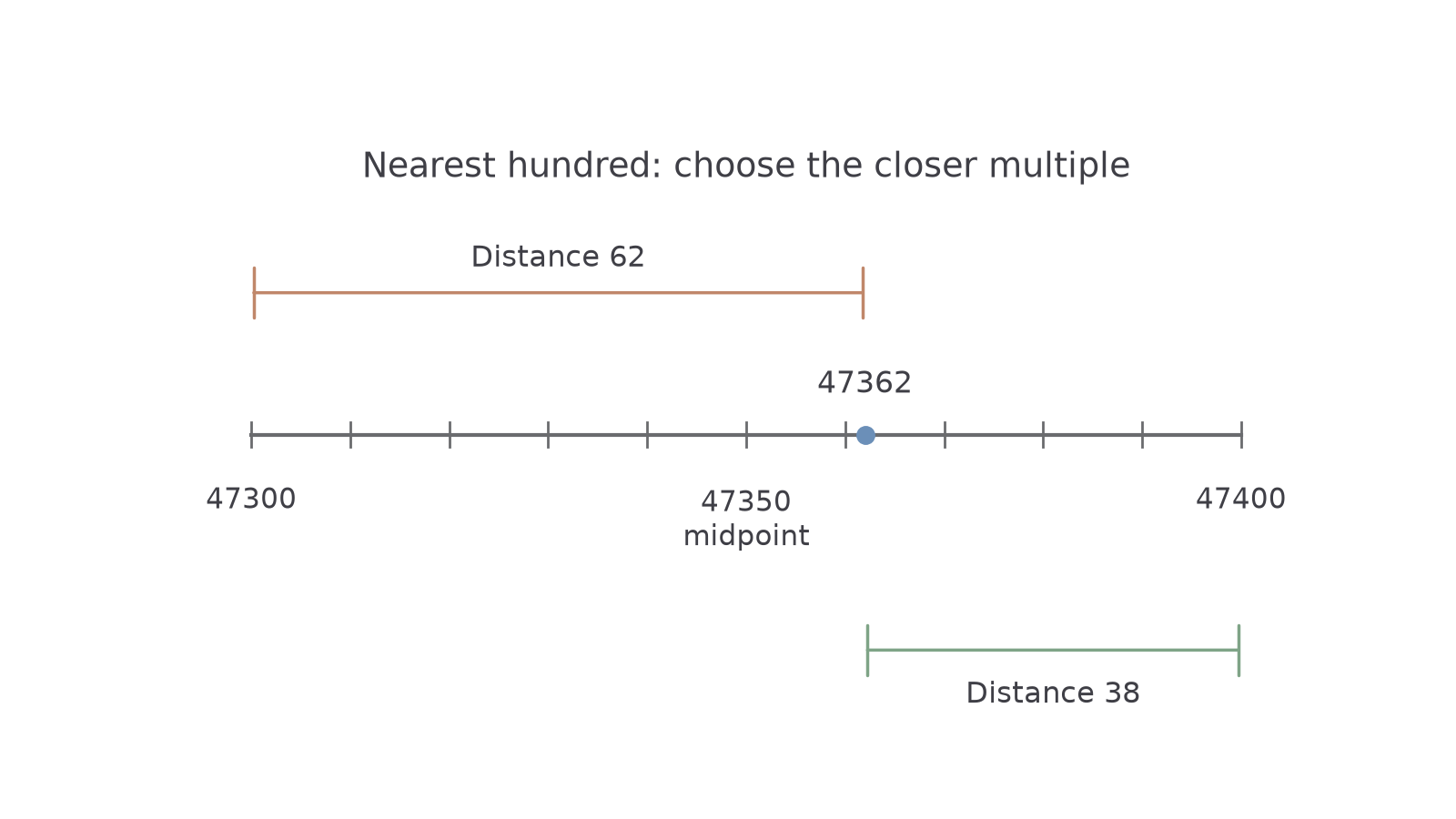
Rounding keeps the number close while reducing its detail. For example, is between the neighbouring hundreds and . It is from the first and from the second, so is nearer.
Rounding to a power of ten
To round a number to a given power of ten is to choose the nearest multiple of that power. For the nonnegative numbers here, a halfway value is rounded to the greater multiple. Thus , rounded to the nearest , is .
Choose the place to retain, then inspect the next digit. Below , leave the retained digit unchanged. At or above, increase it by , carrying if needed. Replace later whole-number places with zeros. The rounding rules are not in either the Foundation or Higher formulae sheet: learn them.
The picture shows the nearest-hundred decision. The marked number lies beyond the midpoint.
[DIAGRAM: asset_slug: rounding_nearest_hundred; caption: 47362 lies closer to 47400 than to 47300; description: Number line from 47300 to 47400 with equally spaced ticks. The midpoint 47350 is labelled. A point at 47362 is 62 above 47300 and 38 below 47400, showing why it rounds to 47400 to the nearest hundred; file: rounding_nearest_hundred.png; recommended_method: matplotlib]
Worked example 1: choose the retained place
Question. Round to the nearest , and .
Plan. Start from the original number each time and inspect the digit just after the required place.
Why keep the zeros? They preserve the number's size after the detailed digits have been removed.
Answer. , and , respectively.
Check. For the hundred, distances and confirm that is nearer.
Change one digit in the original number, from to . The hundreds answer now needs a carry.
Worked example 2: carry through a nine
Question. Round to the nearest , and .
Plan. Use the same three places and carry when increasing a retained .
Why can two requested precisions give the same answer? happens to be both the nearest hundred and the nearest thousand here.
Answer. , and , respectively.
Check. . The lower hundred is away, and the lower thousand is away.
Always round the original value directly to the requested precision. Rounding a rounded value can create a different result.
Watch out
is not rounding to the nearest hundred. It changes the size drastically. Keep the place-value zeros: .
Make one nearest-thousand decision yourself.
Decimal places
Decimal places count positions after the decimal point. A zero still occupies a position: in , the tenths digit is , the hundredths digit is , and the thousandths digit is .
Decimal places
Decimal places measure how many digits are shown after the decimal point. Two decimal places means stopping at hundredths. For example, shows two decimal places; shows one, although the values are equal.
Retain the requested positions and inspect the next digit. Carry through digits of value , as in whole-number addition. Include a final zero when it is needed to show the requested number of decimal places.
Worked example 3: round to hundredths
Question. Round to two decimal places.
Plan. Keep the hundredths position and inspect the thousandths digit.
Why inspect the ? It tells us which adjacent hundredth is nearer.
Answer. .
Check. The distances to and are and ; is nearer.
Keep two decimal places, but change the number so that rounding must carry into the whole-number part.
Worked example 4: show zeros after a carry
Question. Round to two decimal places.
Plan. Round the hundredths up and carry through both retained digits of value .
Why write ? The two zeros communicate the requested precision.
Answer. , to two decimal places.
Check. is below , but above .
Here is a rounding surprise. Directly to one decimal place, gives . Rounding first to two decimal places gives ; rounding that to one gives . Two rounding steps have changed the answer.
Watch out
gives the wrong result if the request was to round the original to one decimal place. Inspect the original hundredths digit : the answer is .
Try another carry, with the same requested precision.
Significant figures
Significant figures count from the first nonzero digit, rather than from the decimal point. This lets you describe precision for very large and very small numbers in the same way.
Significant figures
Significant figures are digits counted from the first nonzero digit. Once counting starts, zeros within the number count too. In , the significant digits are , , , ; the earlier zeros only locate the number's size.
Find the first significant digit, count to the requested last one, then inspect the next digit. Keep leading decimal zeros and replace discarded whole-number places with zeros. For example, to two significant figures is , not . A trailing decimal zero can show precision: has two significant figures, whereas has one.
Worked example 5: a zero can be significant
Question. Round to three significant figures.
Plan. Start at , retain , then inspect .
Why count the zero after ? Counting has already started; that zero holds a place between significant digits.
Answer. .
Check. The result is close to and contains three significant digits: .
Change only the requested precision, from three significant figures to two. The rounding step now affects a different place.
Worked example 6: show a significant zero
Question. Round to two significant figures.
Plan. Keep and , then inspect the next digit, .
Why is the last digit ? Increasing the retained zero by one raises the ten-thousandths digit.
Answer. .
Check. The neighbouring two-significant-figure values are and . The original is from the first and from the second.
A requested number of significant figures must remain visible. For example, to two significant figures is : the final zero is significant.
Watch out
has only one significant figure. Leading zeros do not count. For three significant figures, retain and round to .
Use two significant figures for a different small decimal.
Estimating calculations
We can now return to the calculator puzzle. Round each input to one significant figure, then keep the original operations. The simpler calculation will reveal the expected size.
Estimate
An estimate is an approximate result found using convenient nearby values. It checks size; it does not establish an exact answer. Rounding all inputs to one significant figure does not automatically give an upper or lower bound.
For the method here, round every input to one significant figure. Keep brackets and the numerator/denominator structure. The method is not in either the Foundation or Higher formulae sheet. In an estimation question, show your rounded calculation even though calculators are allowed.
Worked example 7: check a suspicious answer
Question. Estimate by rounding every number to one significant figure. Is the reported result sensible?
Plan. Round the three inputs, calculate simply, then compare the size.
Why does dividing by make the result larger? There are five lots of in , so division by is multiplication by .
Answer. The estimate is . The reported is about ten times as large, so it is not sensible.
Check. , which confirms the estimated division.
Change only the divisor's size, from to . The numerator is unchanged, so the new result should be ten times smaller.
Worked example 8: track the divisor's size
Question. Estimate by rounding every number to one significant figure.
Plan. Use the same rounded numerator and a divisor of .
Why is the estimate ten times smaller? The divisor is ten times larger, with the numerator fixed.
Answer. The estimate is .
Check. , the same rounded numerator as before.
For an accurate result, go back to the original inputs and round only the final answer. A nearby calculator result passes a size check, but could still contain a smaller error.
Watch out
changes division into multiplication. Keep the fraction: .
Keep the numerator but change the divisor's size once more.
Quick Recap
- For a power of ten, round to the nearest multiple and keep place-value zeros.
- Decimal places count from the decimal point; significant figures start at the first nonzero digit.
- Inspect the next digit, and carry when needed.
- Round the original number directly to the requested precision.
- Estimate with simple inputs while preserving every operation.
The opening answer is not sensible. The estimate is , so the reported result is about ten times too large.