3.7 - Angles and perpendiculars with vectors
Coordinates can reveal an angle that is hard to see in a drawing of a solid. In this final part of 3.7, you will use scalar products to find angles and perpendicular directions, then locate the nearest point on a line. Choosing the direction of each vector will matter as much as the calculation.
Two forms of scalar product
How can coordinates tell us whether two directions are perpendicular? Take and . Multiplying matching components and adding gives . This number detects a right angle.
Scalar product
The scalar product, or dot product, of two vectors is a scalar, written . For nonzero vectors, their angle is measured between arrows placed tail to tail, with .
The component calculation and the geometrical angle calculation give the same number.
Scalar product
For and ,
In two dimensions omit the third term. The angle form requires nonzero vectors.
In the formula booklet.
Why does the angle appear? Expanding by components gives . Applying the cosine rule to the triangle formed by the same two arrows gives . Equate the expressions.
For nonzero vectors, a positive scalar product gives , zero gives , and a negative scalar product gives . The boundary values and occur for vectors in the same and opposite directions respectively. Although , the zero vector has no direction and does not define an angle.
Worked example 1: an acute angle between vectors
Question. Find the angle between and .
Plan. Calculate the scalar product and magnitudes, then use inverse cosine.
Answer. , to one decimal place.
Check. The scalar product is positive, so the angle should be acute. Also , agreeing with the cosine rule .
Reverse just the second vector. Its magnitude stays the same, but the angle between the directed arrows becomes supplementary.
Worked example 2: reversing a direction
Question. Find the angle between and .
Plan. Reverse the sign of the scalar product and retain both magnitudes.
Answer. , to one decimal place.
Check. , consistent with reversing one arrow. The negative scalar product correctly predicts an obtuse angle.
Dot products also give equations for unknown components. For example, is perpendicular to when , so .
Watch out
is one number, not a vector of component products. For an angle, divide it by the product of both magnitudes before using inverse cosine.
Use the sign of the dot product as a check.
Angles between lines
A line can be followed in either direction, so its direction vector may be replaced by its negative. This produces two supplementary angles. If a question asks for the acute angle between lines, choose the smaller angle; if it names an angle such as , use the rays from the named vertex.
The smaller angle between two lines, with , satisfies
where and are their direction vectors. The absolute value selects the smaller angle. Perpendicular lines give ; parallel directions give . The same calculation compares the directions of skew lines without pretending they intersect.
Worked example 3: choosing the acute angle
Question. Two lines have direction vectors and . Calculate the acute angle between the lines.
Plan. Calculate the directed-vector angle, then choose the smaller supplementary angle.
The angle between these particular arrows has cosine , so it is . The acute angle has cosine .
Answer. , to one decimal place.
Check. Replacing by gives dot product , and directly produces the same acute angle.
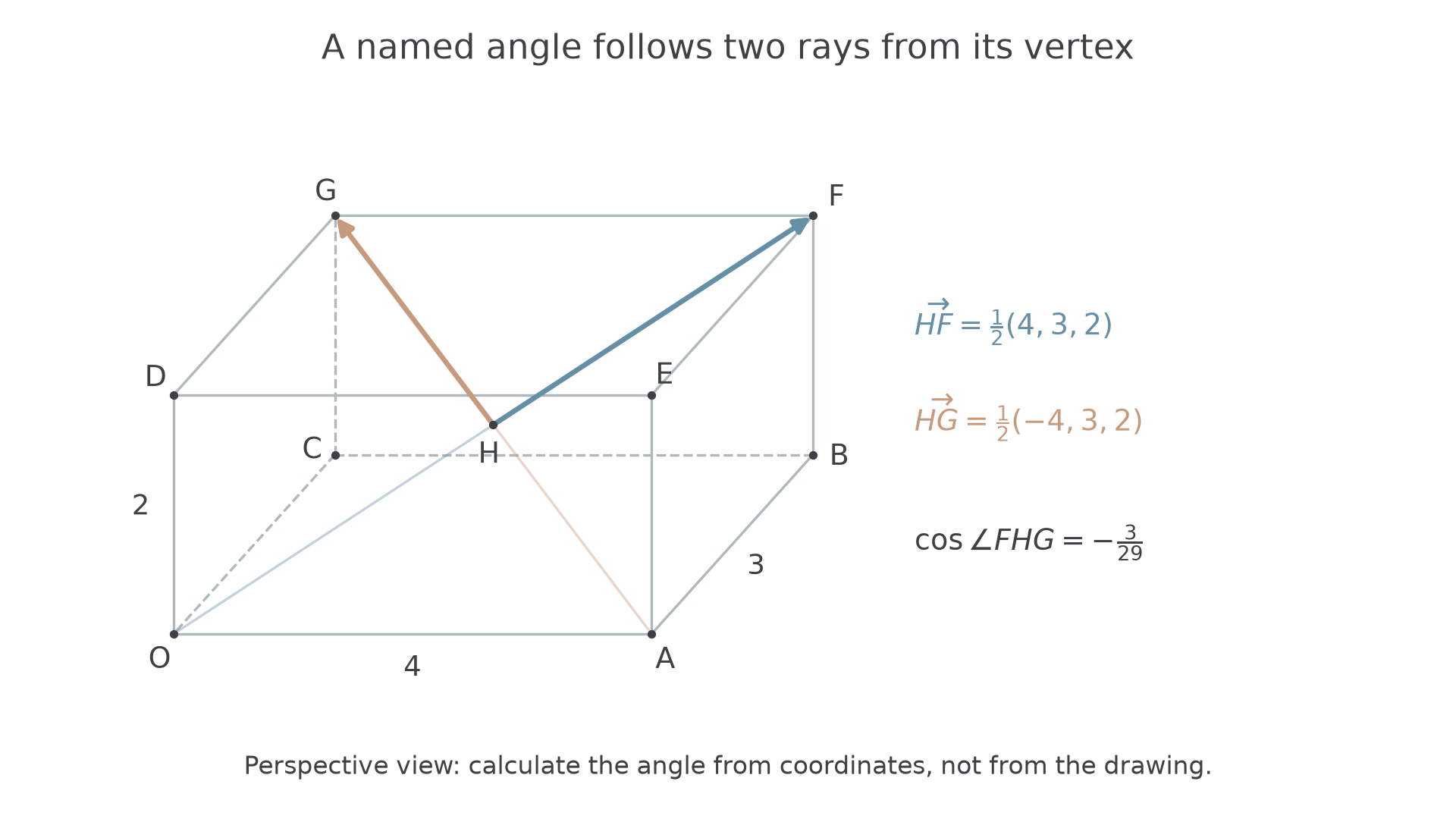
Now put those directions inside a cuboid. The geometry will specify actual rays, so we must not automatically choose the acute angle.
[DIAGRAM: asset_name: Directed angles in a cuboid; asset_slug: cuboid-vector-angles; caption: The angle FHG follows rays from H, so the directions must point from H towards F and G; description: A perspective drawing of a cuboid has O at 0 comma 0 comma 0, A at 4 comma 0 comma 0, B at 4 comma 3 comma 0, C at 0 comma 3 comma 0, D at 0 comma 0 comma 2, E at 4 comma 0 comma 2, F at 4 comma 3 comma 2 and G at 0 comma 3 comma 2. Body diagonals OF and AG meet at H, the centre 2 comma 1.5 comma 1. The rays HF and HG are highlighted with arrows, and edge lengths 4, 3 and 2 are marked. The drawing is a perspective view, not an angle scale drawing.]
Continue this lesson.
You’re previewing NovaLearn without an account. Create a free account to read the rest.
Create free account