4.9.4.10 - Client-server web applications, REST and data formats
Learn how browser applications exchange messages with servers, how REST connects web requests to stored data, how WebSockets support live updates, and how JSON and XML represent exchanged data.
Request-response and WebSockets
A client-server web application divides work between a requesting client and a server that processes requests.
In the request-response model, the client sends a request message identifying an operation or resource, and the server returns a response message. For example, a browser asks for a lesson record and the server returns its data or an error. A request and response are related messages; this does not mean a new TCP connection is required for every request. Modern HTTP can reuse connections.
For rapidly changing information, repeatedly asking “anything new?” can create needless requests and delays. A live chat may need the server to send a new message as soon as it arrives, even if the browser has not just asked for it. WebSocket provides a persistent, full-duplex connection between a browser and a server over TCP. Full-duplex means both endpoints can send data independently, rather than waiting for a new request before every server message.
An initial HTTP-based opening handshake establishes the WebSocket connection; afterwards the endpoints exchange WebSocket messages. A browser exposes this through an API, an Application Programming Interface: defined operations which application code can use. The browser's WebSocket API and the network protocol are related, but are not the same thing. A secure WebSocket connection (wss) adds TLS protection.
Chat, live game updates and live dashboards are useful examples: the connection remains open while updates travel in either direction. Keeping connections open consumes resources and requires handling disconnection/reconnection. A simple page or occasional record request may be adequately served by ordinary HTTP. WebSockets do not make networks instant or remove the need to authenticate users.
Full-duplex connection
A connection over which both endpoints can send data independently in both directions.
CRUD operations through REST
A REST API exposes operations on resources using HTTP, allowing a web application to work with stored data.
CRUD names four basic data operations: Create, Retrieve, Update and Delete. REST, Representational State Transfer, is an architectural style in which clients operate on identified resources through a defined interface. A resource might be a lesson record at /lessons/42; a representation is the data describing that resource, such as JSON.
For the specification's simplified database-connected model, use this correspondence:
| CRUD operation | HTTP method | Corresponding SQL operation | Example purpose |
|---|---|---|---|
| Create | POST | INSERT | Add a new lesson record |
| Retrieve | GET | SELECT | Obtain an existing record |
| Update | PUT | UPDATE | Replace/update the record's data |
| Delete | DELETE | DELETE | Remove a record |
The method tells the API the requested kind of operation; the resource path identifies its target. A POST to /lessons can create a record from data in the request body. A GET for /lessons/42 asks for that resource's representation. A PUT can supply the complete desired representation for an existing resource, while DELETE requests its removal. Actual API designs may also use PATCH for partial changes, or support other operations; this lesson's four-method model is the required correspondence rather than a promise that every POST anywhere performs SQL INSERT.
REST is not SQL sent directly from the browser. The API interprets the request, checks permissions and data, then carries out suitable server-side operations. A failed permission check or invalid request may return an error without changing the database. REST requests should contain the information needed to understand them, instead of relying on a previous conversational request state; this statelessness does not mean the server has no persistent database.
Browser, API and database roles
Browser JavaScript calls an API running on the server, and the server controls access to the database.
The browser first retrieves an HTML page, such as index.html. That page references a JavaScript file which the browser retrieves and executes locally. The script handles interface events, sends HTTP requests to the server's REST API and interprets returned data. Browser execution is distinct from server execution: downloading a JavaScript file from the server does not mean the downloaded script subsequently runs there.
The REST API is created and run on the server. It defines available resource paths, methods, request data and responses. On receiving a request, the API can authenticate the user, check authorisation, validate input and use a database interface to perform the appropriate operation. Database credentials remain on the server rather than being shipped to every browser. The server sends the resulting data/status back through an HTTP response, often as JSON or XML, and the browser script can update the displayed interface.
[DIAGRAM: asset_slug: browser_api_database; description: Browser JavaScript sends HTTP requests to a server-side REST API; the server performs database operations and returns results as JSON or XML.]
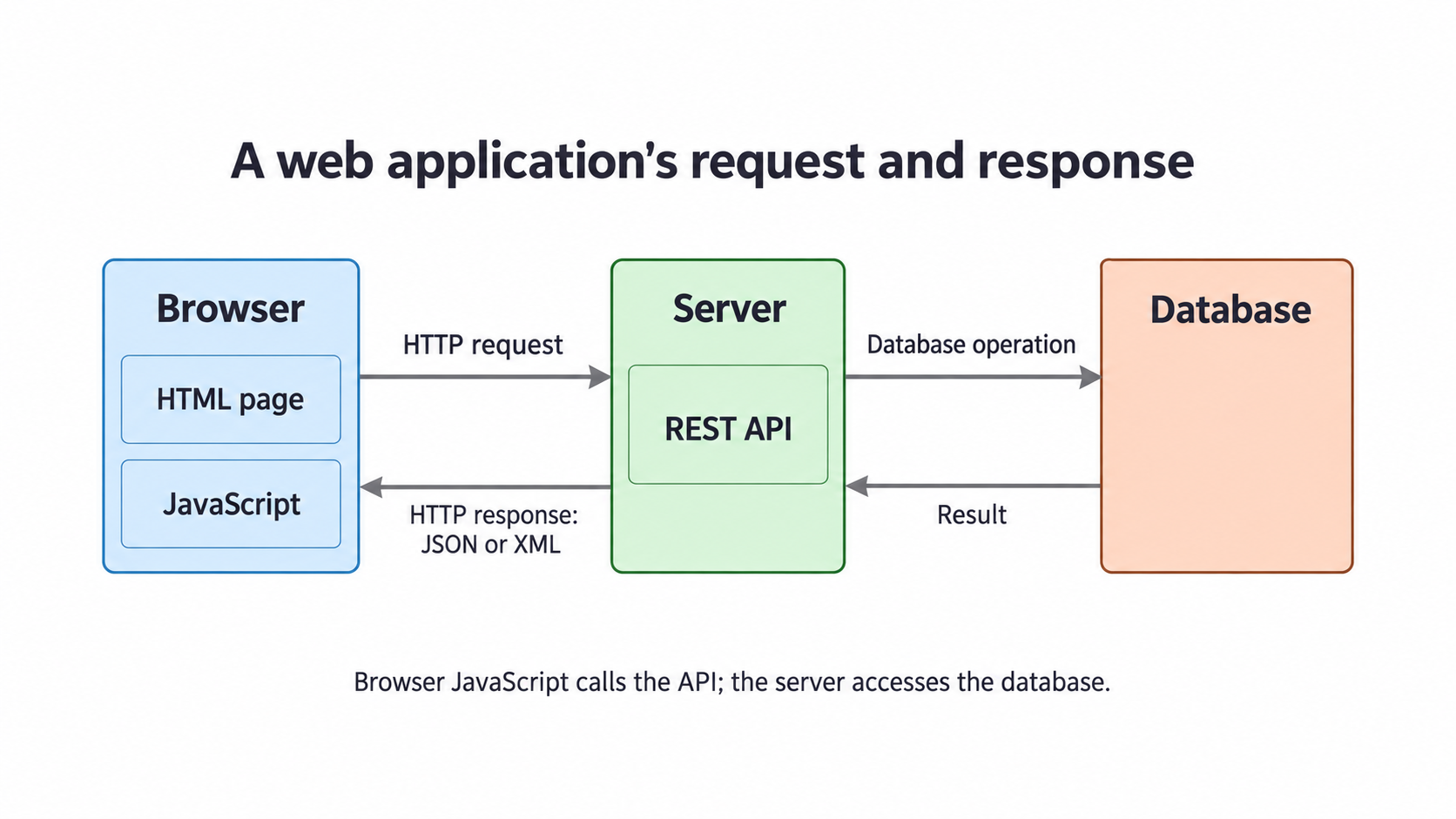
Consider changing a record's title. The browser collects the new title and sends it to the appropriate API resource using PUT. The API verifies that the user may edit that record, checks the title, updates the database and returns a success response or an error. The browser then reflects the confirmed outcome. The browser should not display “saved” merely because it sent the request; the server may reject it or the network may fail.
HTML is the interface document, JavaScript provides browser behaviour, HTTP carries API requests/responses, the API supplies server application behaviour, and the database stores the persistent records. These roles can cooperate without the browser ever making a direct SQL connection.
JSON and XML data formats
JSON and XML are text-based ways to represent structured data exchanged between a server and a web application.
JSON, JavaScript Object Notation, represents objects using named properties and values, and sequences using arrays. Names and string values use double quotes; numbers and Boolean values have their own forms. JSON is a data format that languages other than JavaScript can parse: receiving JSON does not mean executing a JavaScript program.
{"id":42,"title":"Networks","available":true}
XML, Extensible Markup Language, uses named elements with tags and can use attributes. An element hierarchy represents structure. The same simple record can be represented as:
<lesson><id>42</id><title>Networks</title><available>true</available></lesson>
The repeated opening/closing XML tags make this representation longer. JSON is generally more compact for simple web records, so fewer bytes need to be transferred. Its object/array structure and less verbose notation often make such data easier for people to read and developers to create. For these common structures, JSON is typically simpler for software to parse and can be quicker to parse. These are the specification's expected comparisons, not a universal speed guarantee: actual size and parsing time depend on the data, representation and parser.
XML remains useful when element/attribute structures, document markup or existing systems require it. Its tags can make document relationships explicit. Both formats still require agreed field meanings and validation; changing formats does not automatically make untrusted input safe. A parser turns the text into data the program can use, but the application must still check whether that data is suitable.
The format describes the data; HTTP/WebSocket describes its communication; JavaScript or another program processes it. These are different layers of responsibility.