4.3.2.1 - Tree traversals (VB.NET)
Learn how moving a node's visit before, between or after its two subtree visits changes a traversal. Use those orders to copy a tree, output ordered keys and process an expression or safely empty a tree.
VB.NET route status: incomplete: runnable support pending. The native examples and code answers here are written practice.
Pre-order, in-order and post-order
A tree traversal applies the same rule recursively to every subtree, so the root of a subtree is treated like the root of the whole tree.
Here, visit means output the node's value. Use left before right throughout. An absent child contributes nothing.
| Order | Actions at a nonempty subtree |
|---|---|
| Pre-order | Visit root; traverse left; traverse right |
| In-order | Traverse left; visit root; traverse right |
| Post-order | Traverse left; traverse right; visit root |
[DIAGRAM: asset_slug: traversal_tree; description: Exact binary search tree with root 8 and six nodes for comparing traversal orders]
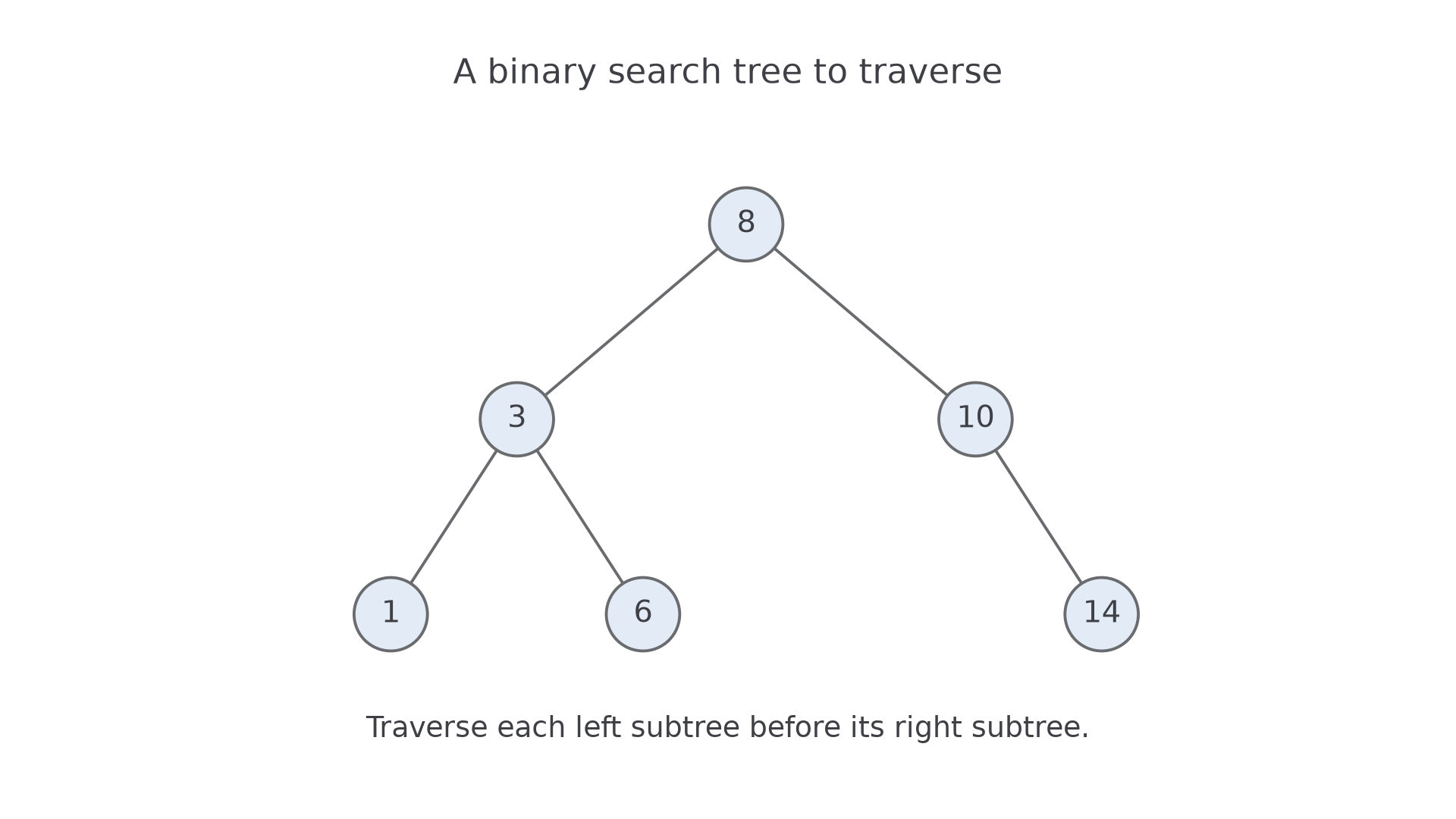
The pictured tree has root 8; its left child is 3, with children 1 and 6. Its right child is 10, which has right child 14 and no left child. Pre-order gives 8, 3, 1, 6, 10, 14. In-order gives 1, 3, 6, 8, 10, 14. Post-order gives 1, 6, 3, 14, 10, 8.
For example, post-order cannot visit 3 until the subtrees rooted at 1 and 6 have finished. It cannot visit 8 until both the entire 3 subtree and the entire 10 subtree have finished. Do not merely reverse pre-order: that would give 14, 10, 6, 1, 3, 8, which reverses the left/right order.
Tracing recursive traversal source
The recursive procedure must stop at an absent child before trying to read that child's value or links.
This VB.NET representation uses references for the links. Nothing means no child. The declarations and procedures belong in the same project; the procedure belongs inside a module or class.
Public Class Node
    Public Value As Integer
    Public Left As Node
    Public Right As Node
End Class

Module Program
    Sub InOrder(node As Node)
        If node Is Nothing Then Return
        InOrder(node.Left)
        Console.WriteLine(node.Value)
        InOrder(node.Right)
    End Sub
End Module
Calling InOrder(root) on the pictured tree first calls InOrder on 3, then 1, then 1's absent left child. That final call returns immediately. The call for 1 prints 1, checks its absent right child and returns to 3. The saved call for 3 can now print 3 and explore 6. Recursion remembers both the node reference and where to resume; returning does not restart the parent procedure.
Continue this lesson.
You’re previewing NovaLearn without an account. Create a free account to read the rest.
Create free account