4.13.1.1–4.13.1.2 - Requirements, abstraction and iterative design
Learn how to turn a real problem into agreed requirements and a useful model, then design a modular solution that can improve through feedback.
Defining the problem with users
A useful program solves a defined problem for particular people, rather than merely performing operations that its developer finds interesting.
Suppose a community workshop lends tools. Staff currently record loans on paper, and sometimes cannot tell whether a tool is available. “Build a tool app” names a possible product but does not define the problem. A clearer statement is: staff need to record each loan and return so that they can determine which tools are available without searching several paper sheets.
Find out how the current work happens. Intended users are people who will use the system; they may need different things. Interview the lending staff, observe a busy lending session and inspect anonymised example records. Ask what happens when a borrower has the same name as another person, a tool is damaged or a return is recorded incorrectly. These questions expose cases that a developer might otherwise miss. Research supplies evidence; dialogue with users checks whether the interpretation is right.
Separate the underlying need from a proposed implementation. A user might request a red button because failed returns are difficult to spot. The requirement is that failures are clearly identified; button colour is one design choice. Agree the purpose, inputs, outputs, constraints and limits of the problem before committing to that choice. Record disagreement and resolve it with the relevant users instead of silently guessing.
Requirements and an abstract data model
A requirement states what the solution must achieve, while a data model identifies the information and relationships needed to achieve it.
Requirement
A documented capability or constraint that the solution must satisfy and that can be checked against evidence.
Functional requirements describe behaviour: record a loan, record a return or list available tools. Non-functional requirements describe qualities or constraints: authorised access, an agreed response time, usability or operation on the workshop's existing computer. “Fast and easy” is ambiguous. “Display the availability of a selected tool within two seconds on the workshop computer with 5,000 stored loans” gives a condition and an observable result. The threshold comes from the users' needs, not a universal rule.
Use abstraction to retain relevant detail and omit irrelevant detail. The tool-loan model might contain:
| Entity | Relevant attributes | Reason |
|---|---|---|
| Tool | ToolID, description, serviceable status | Distinguishes physical tools and prevents damaged ones being lent |
| Borrower | BorrowerID, name, contact details | Distinguishes people who share a name |
| Loan | LoanID, ToolID, BorrowerID, loan date, return date | Links a particular borrower to a particular tool over time |
A tool can have many loans over its lifetime; each loan refers to one tool and one borrower. A missing return date represents a current loan. That model supports availability decisions without storing a borrower's favourite colour. Do not omit a relevant physical distinction: two drills of the same model still need separate ToolIDs. Validate the model against real examples and agreed privacy constraints before choosing a storage structure.
A model is a representation of the problem, not a promise that every listed attribute must become a particular database column. Design later chooses an appropriate record, collection or relational representation.
Designing structures and clear interfaces
Design explains how the agreed requirements will be met before the complete solution is constructed.
Choose data structures that support the required operations. For the workshop, records represent tools and loans, while a keyed collection or suitable database relation permits lookup by ID. Explain the reason for a choice: a key identifies an exact tool; searching by description alone could return several drills. Plan the important algorithms, such as the conditions under which a new loan may be recorded, and how errors are handled. Design the human interface around the staff's actual tasks: select a tool, identify a borrower, confirm the loan and receive a clear success or failure message.
Divide responsibilities into modules with clear documented interfaces. An interface specifies what another part supplies, what it receives and any assumptions or effects. It is not just the visual screen.
| Module responsibility | Documented interface example |
|---|---|
| Check availability | Given a ToolID, returns whether the tool is serviceable and has no current loan |
| Record a loan | Given a valid ToolID and BorrowerID, either stores one loan and returns its LoanID, or returns a stated failure reason |
| Display feedback | Given a result and message, presents confirmation or a failure to the user |
State whether an operation changes stored data and what happens for an unknown ID. A caller should not need to inspect another module's internal representation to use it. Separating storage, loan rules and display makes a change to the screen less likely to damage lending rules, and permits focused testing. The design should still show how the modules cooperate; an unexplained list of names does not specify a solution.
Prototypes and iterative refinement
A design can change when a small working version or user feedback reveals something that was not understood initially.
Prototype
A limited version or model used to investigate a requirement, design choice or technical uncertainty before committing to the full solution.
A screen mock-up can reveal confusing labels; a small loan-recording prototype can reveal that a tool may be reserved without being borrowed. Choose the prototype to answer a question. It need not be a polished or complete product. Discuss its behaviour with users, revise the requirements or model where justified, then update the affected design and test the change. Feedback does not justify adding every requested feature: check its value, scope and available time.
[DIAGRAM: asset_slug: iterative-development; description: Iterative development links clarified requirements, small design changes, building and testing, and review with users in a feedback cycle.]
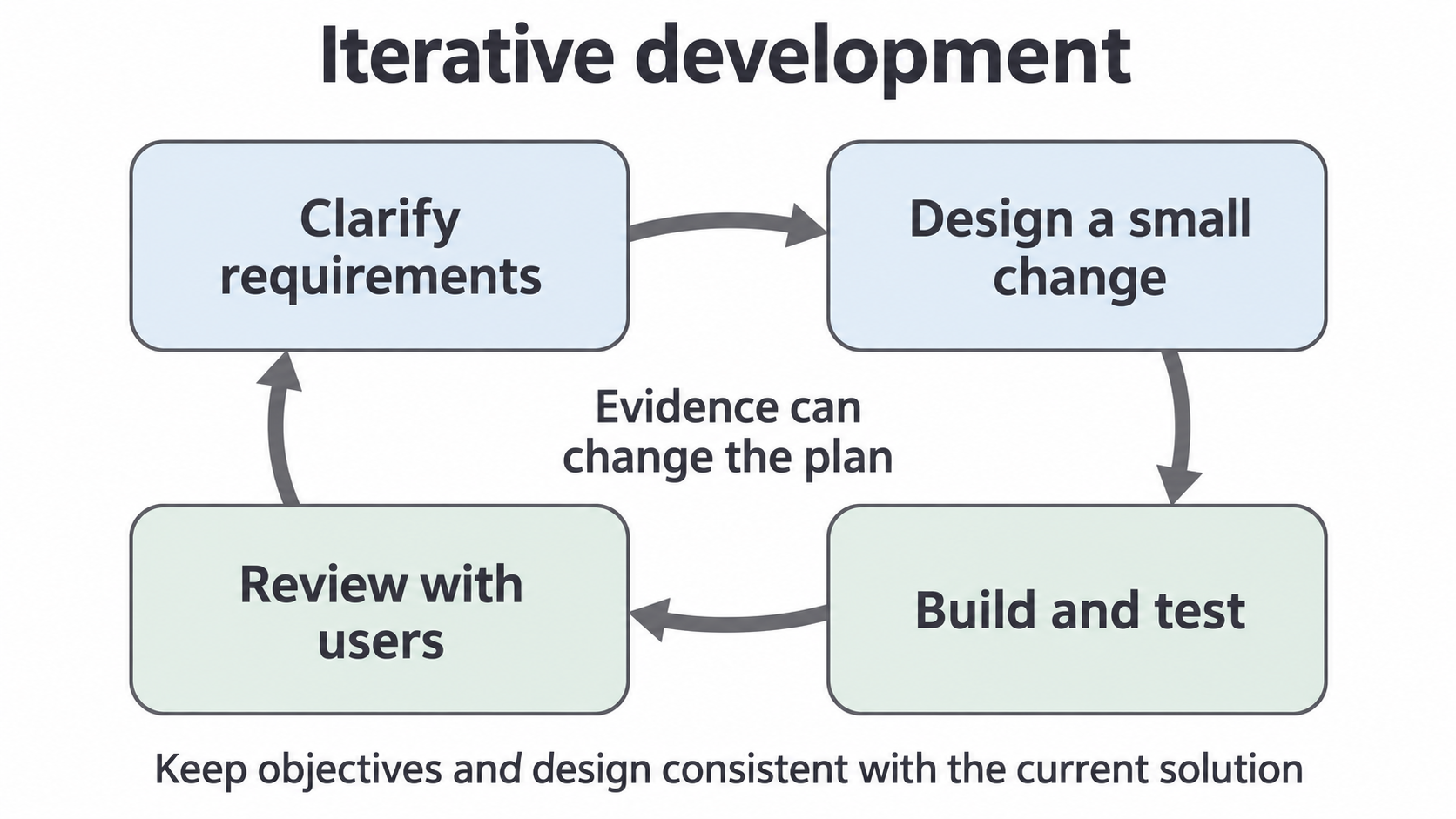
An agile approach develops a solution through short iterations and frequent feedback rather than assuming that every requirement can be fixed at the start. An iteration should produce a useful result or evidence about a risk. For example, discover during a return prototype that staff sometimes reverse a mistaken return. Agree what “undo” should mean, revise the loan state model, and then design the correction mechanism. Keep requirements, design and implementation consistent with the current decision.
Iteration still needs planning and documentation. Otherwise the program can drift from the users' needs, and a later evaluator cannot tell why decisions changed. Save a concise record of the feedback, the decision and its consequence. This is a problem-solving skill for Paper 1; it does not require a particular programming language.
Define the need with users, model only relevant information, design clear responsibilities, and use evidence to refine the solution.