4.7.3.6–4.7.3.7 - Interrupts and processor performance
A processor must respond to events while preserving the program it interrupted, and its speed depends on more than clock frequency. In 4.7.3.6 you will follow interrupt handling; in 4.7.3.7 you will explain how six hardware factors affect performance under different workloads.
Interrupts and the saved environment
An interrupt lets an event request the processor's attention without requiring the running program to keep checking for that event.
Interrupt
An interrupt is a signal or event that requests a change from normal program execution to an interrupt-handling routine.
A device controller might signal that input has arrived or an output transfer has finished. A timer can signal that the current task's allotted time has elapsed. The processor responds using an interrupt service routine (ISR): instructions that perform the work required for that event. Polling repeatedly asks whether an event has occurred; interrupts allow other processing between events, although handling the interrupt still takes time.
In the basic fetch-execute model, the processor completes the current instruction and checks for pending interrupts at an instruction boundary. If an interrupt is accepted, normal fetching is diverted to the ISR. An interrupt is not another datum for the instruction in CIR and does not necessarily abandon the whole program. Masking and priority can determine whether a pending request is accepted now; a task must give any special rules it uses.
Before the ISR changes working registers, the processor/system saves the volatile environment: the state that would otherwise be overwritten. This includes the return PC, relevant general-purpose register values and status flags. A stack or other reserved memory can hold the saved state. The return PC identifies where the interrupted program must continue; working values and flags preserve what it was doing. Merely saving the program's instructions is insufficient because the instructions do not record its current intermediate results.
The ISR's starting address is placed in PC, and its instructions are fetched and executed. It deals with the event, such as obtaining a device value and acknowledging the request. On return, the saved state is restored and execution resumes from the saved PC. The exact registers and automatic hardware/software steps depend on the processor; the essential principle is to preserve and restore the interrupted computation.
[DIAGRAM: asset_slug: interrupt_flow; description: Interrupt handling saves the return PC and working state before the ISR and restores them before the main program resumes]
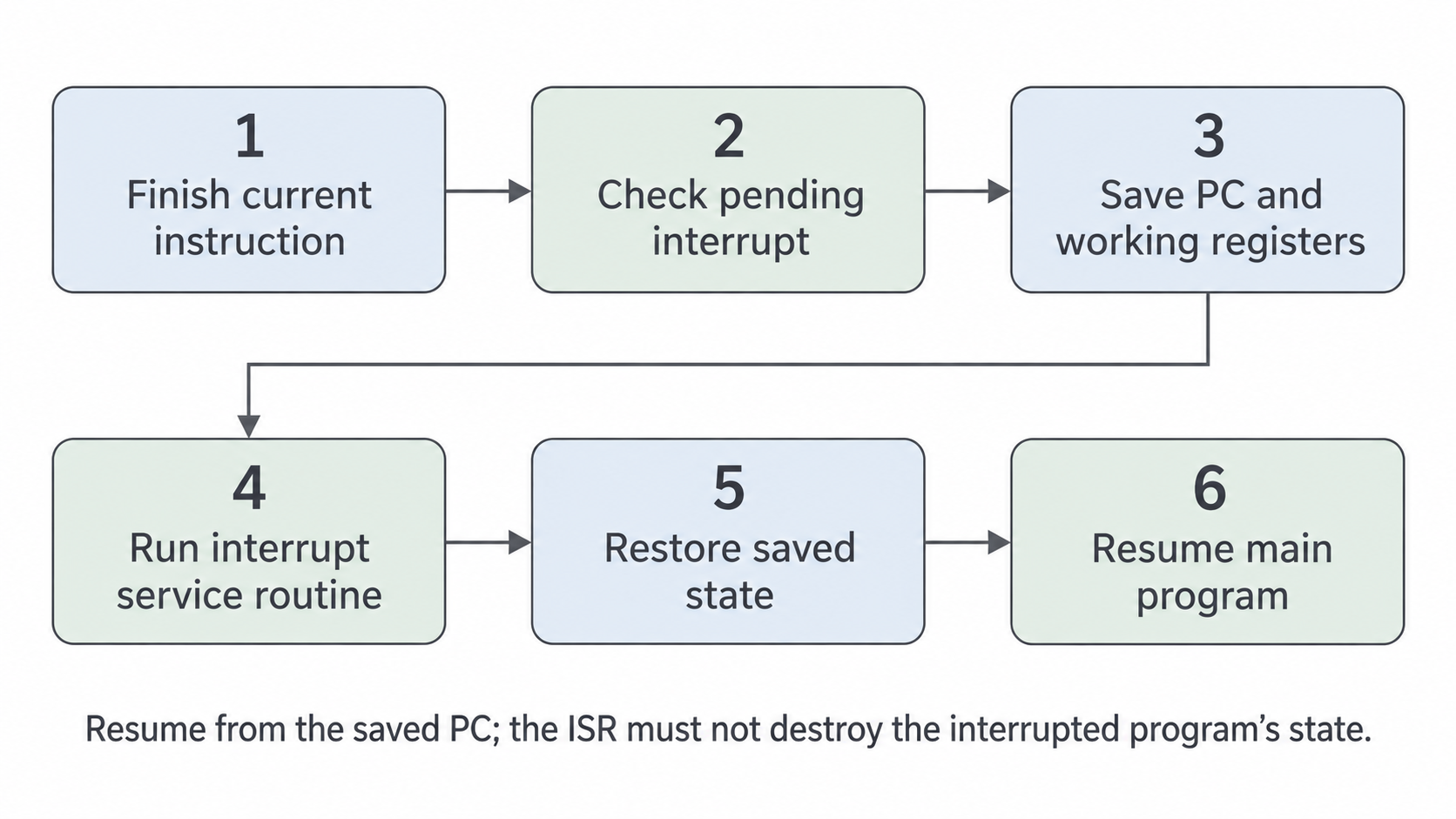
For example, after a normal instruction PC is 41, ACC is 17 and the zero flag is clear. If the ISR uses ACC to process an input of 6, it must not leave the original program with ACC 6. Restoring ACC 17, the original flags and PC 41 lets the next normal instruction use the expected state. Resuming at the ISR's final PC would continue in the wrong program.
Clock speed and hardware widths
Clock frequency and widths affect different limits, so a larger number does not always predict a faster program.
Clock speed is the number of timing cycles per second. If two otherwise identical executions require the same number of cycles, the higher-frequency processor completes them sooner. A 2 GHz clock produces two billion cycles per second; it does not necessarily execute two billion instructions per second. Instruction complexity, memory waits and the work completed per cycle also matter.
Use this simplified relationship only when the question gives or justifies the cycle count.
An illustrative task requiring six billion cycles takes 3 seconds at 2 GHz and 2 seconds at 3 GHz. That comparison assumes the cycle count stays six billion. Comparing unrelated processors solely by GHz ignores differences in their design and workload.
Word length is the number of bits the processor handles as a natural unit in its registers/operations. A wider word can hold a larger integer or allow a large value to be processed using fewer separate operations. A 64-bit machine need not split a 64-bit value into two 32-bit pieces for an operation supported at full word width. It does not follow that every small-value task becomes twice as fast: both machines may already process that task in one operation.
Data bus width determines how many bits can be transferred in one bus transfer. Under a simplified model, a 64-bit datum takes four transfers on a 16-bit bus or two on a 32-bit bus. Wider transfers can reduce the number required when memory/controller timing and the rest of the system permit it. Do not confuse this width with word length, even if a machine happens to use the same value for both.
Address bus width determines the number of directly selectable locations. An -bit address bus can identify locations; location size determines the corresponding capacity. A wider bus permits more addressable memory. If an application needs a larger working data set, that can let more of it be held in directly addressable main memory, avoiding slow secondary-storage transfers. Width alone neither installs that memory nor makes every access faster. A small application that already fits gains no automatic speed-up from more possible addresses.
Cores, cache and workload limits
More cores and a larger cache improve performance when the program can use what they provide.
A core is a processing unit able to execute an instruction stream. Multiple cores can run different tasks concurrently or divide a suitably parallel task. If four independent images can be processed separately, four cores may work on one each. A single stream in which each step needs the previous step's result cannot simply be split four ways. The program/operating system must distribute work, and communication or synchronisation also consumes time. Four cores therefore do not guarantee four times the speed for one task.
Cache memory is small, fast memory close to or within the processor, holding copies of recently or frequently used instructions and data. A cache hit supplies a requested item from cache rather than requiring a slower main-memory access. A cache miss requires it to be obtained from the slower level. Programs often reuse nearby or recently accessed items, making cache valuable. A larger useful cache may keep more of a repeatedly used working set and reduce misses, but a stream of new data with little reuse may benefit less. The processor still fetches and executes instructions; cache changes where some of their bits can be obtained quickly.
Consider two workloads. An animation renderer can divide independent frames between cores, while each core repeatedly accesses local working data. Extra cores and a cache that holds that working data can both help. A serial program that continually reads new data from a slow disk may instead wait for input; extra cores, GHz or cache cannot remove that disk bottleneck by themselves.
When comparing systems, link the changed feature to the operation it improves and the workload condition needed. Wider data paths can reduce transfers, wider words can reduce multi-part arithmetic, more addresses can permit a larger working memory, cache can reduce memory waits, a faster clock can complete a fixed cycle demand sooner, and more cores can share independent work. These mechanisms can interact, so no one specification number gives a universal ranking.
Explain a performance change through a mechanism and a workload condition. More hardware capacity is useful only when it removes a limit the task actually encounters.