4.1.2.1–4.1.2.2 - Procedural design and hierarchy charts (VB.NET)
Learn to organise a program around routines, refine a large job into smaller modules and use a hierarchy chart to communicate that design. Compare this with organising behaviour around objects. The VB.NET route is incomplete: runnable support pending; marked programming here uses written source without Run.
Programming paradigms
A programming paradigm is a way of organising a solution. In procedural programming, routines act on data through a planned sequence of calls. In object-oriented programming, classes combine state and behaviour; objects collaborate through their methods. Both can use sequence, selection, iteration and subroutines. OOP is not simply a program that has functions.
Here is a procedural counter, organised as data passed to a routine:
Module Program
    Function Increment(ByVal count As Integer) As Integer
        Return count + 1
    End Function

    Sub Main()
        Dim count As Integer = 0
        count = Increment(count)
        Console.WriteLine(count)
    End Sub
End Module
The same small behaviour can be organised around an object:
Public Class Counter
    Private value As Integer = 0

    Public Sub Increment()
        value += 1
    End Sub

    Public Function CurrentValue() As Integer
        Return value
    End Function
End Class

Module Program
    Sub Main()
        Dim counter As New Counter()
        counter.Increment()
        Console.WriteLine(counter.CurrentValue())
    End Sub
End Module
Both print 1. The procedural version keeps count in the caller. Each Counter object instead owns its private value; callers use the public methods. Multiple counters can have independent state. Class construction and encapsulation are developed in the next lesson; this is a first experience of reading and changing object behaviour.
Choose a paradigm around the problem. A short numeric transformation may need only a function. A system modelling many accounts with their own state can benefit from objects. OOP can organise complex models and protect invariants, but adds classes and relationships that need careful design. Neither paradigm guarantees maintainability by its name alone.
Structured decomposition
Structured design decomposes a problem into modules with clear responsibilities and uses understandable control structures rather than arbitrary jumps. Top-down refinement begins with the overall job and progressively breaks it into smaller jobs until each can be implemented directly.
For a ticket report, start with produceReport. Refine it into readSales, calculateRevenue and displayReport. Refine calculateRevenue further into priceForCategory and sumRevenue. A hierarchy chart places the overall module at the top and its subordinate modules below it. A connecting line shows decomposition or a calls relationship in the stated chart convention. It does not by itself show a condition, loop or the order of execution; those belong in an algorithm or control-flow representation.
[DIAGRAM: asset_slug: vbnet_report_hierarchy; description: A ticket-report hierarchy with produceReport above readSales, calculateRevenue and displayReport, and priceForCategory and sumRevenue below calculateRevenue. Connections show decomposition, not execution order.]
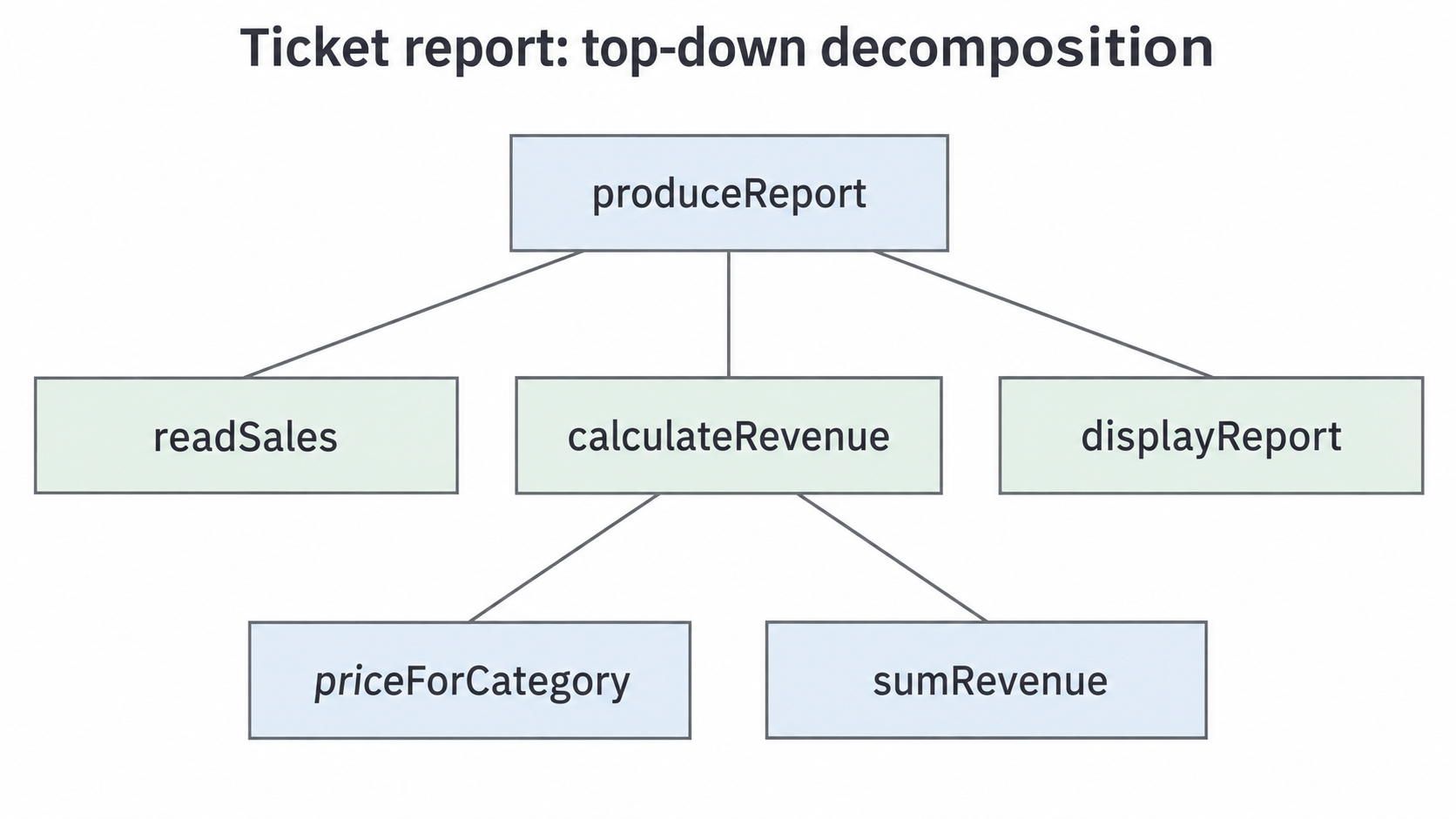
To construct such a chart in a notebook, write the overall module at the top, place its immediate subordinate jobs on the next level and connect each to its parent. Place further refinements below the job they belong to. Avoid connecting sibling modules just to imitate a left-to-right timeline. A flat list of all procedures loses the parent-child structure.
Continue this lesson.
You’re previewing NovaLearn without an account. Create a free account to read the rest.
Create free account