1.3.3 - Network hardware and architectures
A network needs connections, forwarding devices and an arrangement for providing services. This lesson distinguishes those jobs and uses small organisations to show why a physical layout and a client-server or peer-to-peer architecture are separate choices.
The hardware along a data journey
Each piece of network hardware solves a particular connection or forwarding problem. A network interface controller/card (NIC) provides a device's network interface. A wired NIC connects to a cable; a wireless interface communicates by radio. A link-layer address such as a MAC address helps identify an interface on its local network.
A switch connects devices on a LAN. An Ethernet switch learns which interfaces are reachable through which ports and forwards a frame towards its destination MAC address. An unknown destination or a broadcast may need wider forwarding, so “a switch always sends every frame down exactly one cable” is too absolute. A hub instead repeats incoming signals to its other connected ports, causing all connected devices to receive the traffic. That shared traffic makes a hub less efficient than selective switching and can create contention. A hub does not use an IP routing table to choose a destination network.
A wireless access point (WAP) connects wireless devices to a network, often bridging them onto a wired LAN. A router connects networks and forwards IP packets using destination addresses and routing information. For a remote destination, a desktop sends towards its gateway; the router then selects the next network hop. The local switch's MAC-forwarding decision and the router's IP-routing decision are different jobs.
A modem modulates and demodulates signals to communicate over the access medium supplied by the provider. The familiar digital-to-analogue/analogue-to-digital description is a useful introductory example; access technologies vary. Do not assume every fibre connection needs a traditional telephone-line modem. An appropriate provider termination device is required for the particular connection. Home equipment often combines router, switch, WAP and modem functions in one box, but the functions remain distinct.
Cables provide wired links: copper Ethernet is common for device connections, while fibre supports high-capacity links and long distances. Selection depends on required rate, distance, installation cost and interference. Wireless provides mobility but its effective rate and reliability depend on range, obstacles, interference and competing devices. Neither medium alone provides the application's service.
[DIAGRAM: Small office LAN with wired switching, a wireless access point and an external routed connection; asset_slug: office-network-hardware; caption: Local devices share a switch, the laptop joins through the access point, and the router connects the LAN towards the provider.]
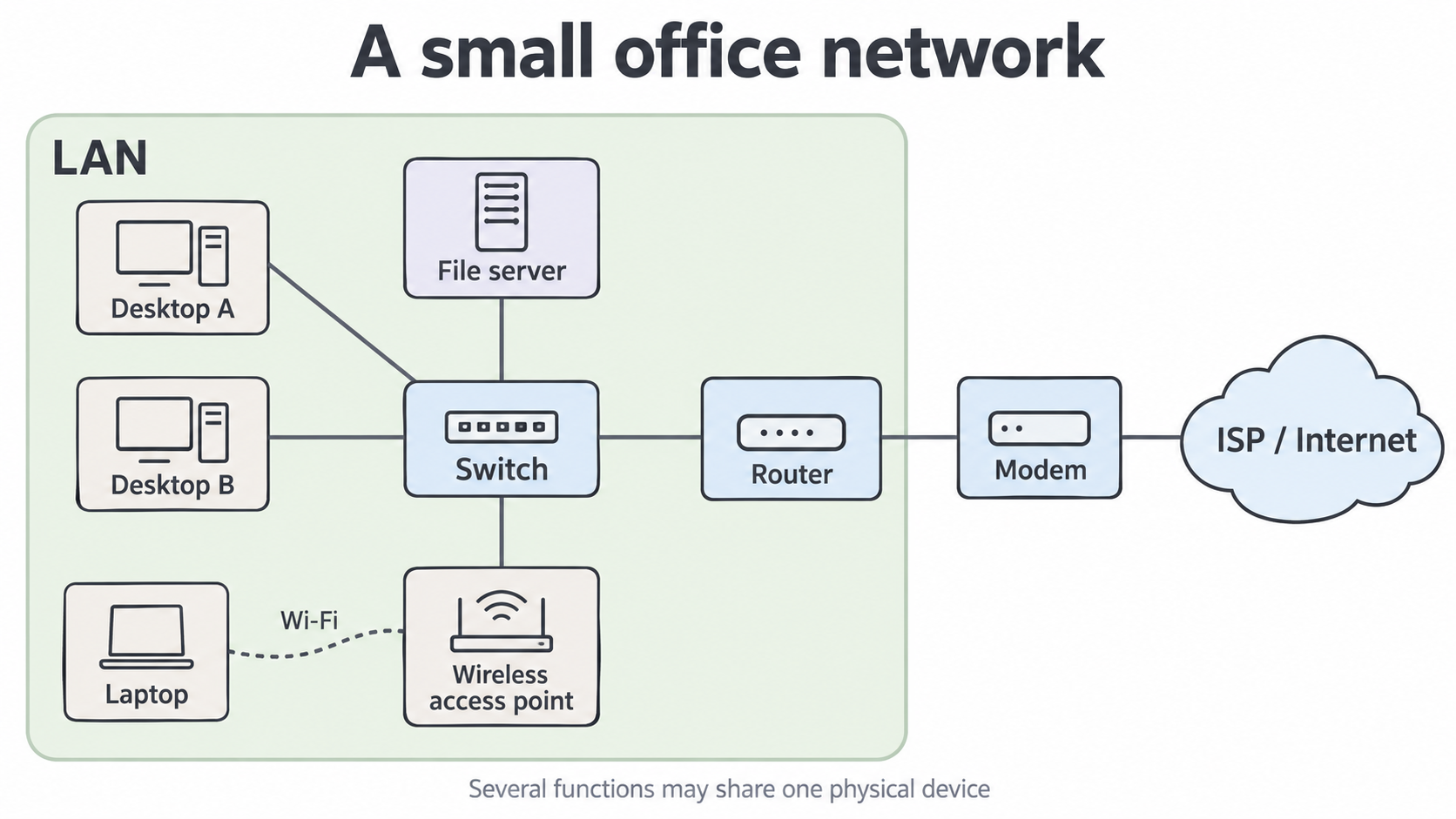
Follow a laptop's file request to the office file server: wireless NIC → WAP → switch → server NIC. If the laptop instead requests a remote service, the switch forwards towards the router, then the provider connection. A modem is not the machine that stores the file, and a WAP is not necessarily the Internet gateway.
Topology and failure paths
A topology describes how network nodes and links are arranged, physically or logically. Physical topology concerns actual connections; logical topology concerns how data flows. It does not tell you whether a connected computer is a server.
In a star layout, devices have individual links to a central device, commonly a switch. If one desktop's cable fails, that desktop loses its connection but the other links can still work. If the only central switch fails, all dependent connections are affected. This makes expansion and individual-link fault isolation convenient, while creating a central dependency. Redundant designs can reduce that dependency at additional cost and complexity.
In a bus arrangement, devices share a backbone. A backbone fault can affect many devices, and shared access can create contention. In a ring, nodes form a loop and data follows the relevant ring mechanism; a simple ring's broken link can interrupt the route. Some ring implementations add redundant paths or bypass mechanisms, so identify the stated design before claiming every ring has the same failure behaviour.
Continue this lesson.
You’re previewing NovaLearn without an account. Create a free account to read the rest.
Create free account