1.2.3 - Writing and following algorithms
An algorithm makes the steps of a solution precise enough to follow. You will build solutions from sequence, decisions and loops, read OCR pseudocode and flowcharts, and trace changing values rather than guess a final output.
Sequence changes program state in order
An algorithm is a finite, unambiguous set of steps for solving a problem. Begin with its input/output contract: what information is supplied, which assumptions hold and what result is required. For a receipt calculation, assume a non-negative item price and a positive whole-number quantity; the required output is their product. Those assumptions tell us what the algorithm must handle and what separate validation might be needed.
Pseudocode describes a program's logic without requiring a particular executable language. OCR uses a defined notation in questions, but an answer may use another clear style whose meaning a competent programmer can reasonably infer. Clear structure and correct logic matter more than copying punctuation from a model.
input(prompt) obtains user input and print(...) sends output to the screen. str(value) converts a value to text for output; int(text) converts valid integer text to a number. State the supplied inputs when following an input-dependent algorithm. A subroutine is a named routine called from elsewhere; its inputs and results will be developed in the procedural lesson.
In OCR pseudocode = assigns a value and == compares values. A variable is introduced when first assigned and takes the type of the assigned value. A variable created inside a subroutine is local; a main-program variable can be explicitly made global with global. A variable stores a value that may change. Each assignment evaluates its right-hand expression using the current values, then replaces the destination value.
price = 6
quantity = 3
total = price * quantity
quantity = quantity + 1
print(str(total))
This prints 18. Increasing quantity to 4 afterwards does not make total automatically recalculate: total already holds the result 18. Sequence means instructions are followed in order. Swapping assignments can therefore change the result or attempt to use a value before it exists.
Selection chooses a path from a condition
Selection chooses which instructions to follow based on a condition. Comparisons ==, !=, <, <=, > and >= produce Boolean values, true or false. AND requires both conditions to be true; OR requires at least one; NOT reverses a Boolean value.
if age >= 16 AND has_permission == true then
    print("Eligible")
else
    print("Not yet")
endif
For age 16 and permission false, the first comparison is true but the combined condition is false, so the output is Not yet. Equality belongs in the threshold: age > 16 would reject a 16-year-old even with permission. Testing only age 20 would miss that boundary error.
An elseif supplies a later condition if an earlier one was false. For example, an ordered grade algorithm can test score >= 80, then score >= 60, then use else. A score of 85 takes the first branch only. Testing the lower threshold first would capture 85 too soon. switch/case selects among values of one expression, with default for an unmatched value:
switch choice:
    case "P":
        print("Print")
    case "S":
        print("Save")
    default:
        print("Unknown choice")
endswitch
Assume choice contains the user's command. With choice = "S", only the S case prints Save. With choice = "X", neither named case matches, so default prints Unknown choice. This is a choice among values of one expression, rather than a sequence that prints every case.
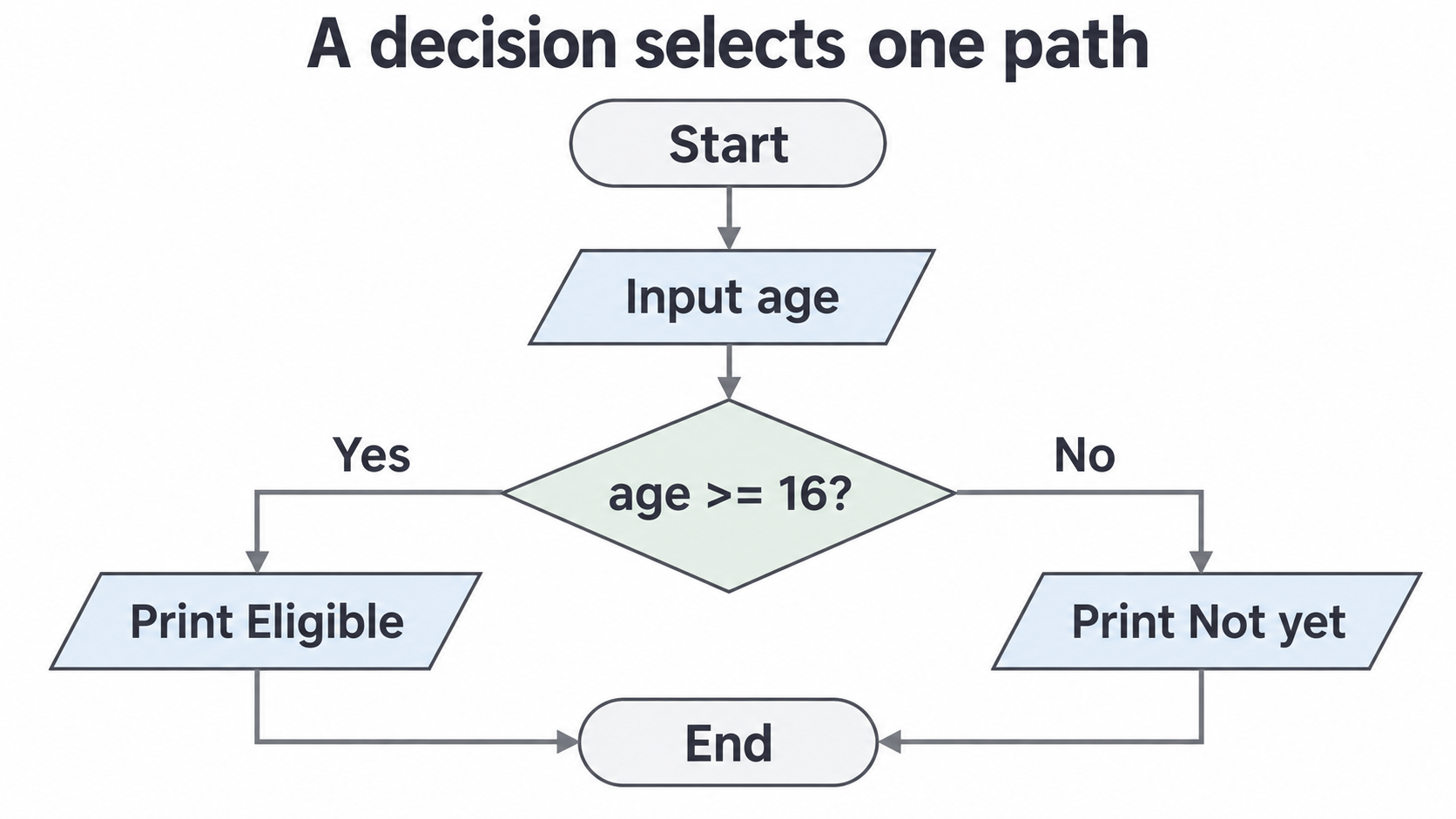
A flowchart shows the same control flow using arrows. Ovals indicate start/end, rectangles indicate processing, parallelograms indicate input/output and diamonds indicate decisions. The branch labels state which outcome follows which arrow. Here is a simpler age-only decision; the permission condition above is not part of this diagram.
[DIAGRAM: Age-only selection flowchart; asset_slug: age-decision; caption: Follow one labelled branch from the decision, then continue to the shared end.]
Iteration repeats with clear bounds and termination
Iteration repeats instructions. A count-controlled loop is suitable when the number of repetitions is known. OCR's for i = 0 to 3 includes both ends, so its values are 0,1,2,3: four iterations. In Python, range(0, 4) gives those same values because its upper bound is excluded.
total = 0
for i = 1 to 3
    total = total + i
next i
Total becomes 1,3,6 after the three iterations. Initialising total once before the loop preserves the accumulating sum; initialising it inside the loop would discard earlier work.
A while loop tests its condition before entering the body, so it may run zero times. A do/until loop tests after the body, so it runs at least once and stops when its condition is true. These opposite stop conventions matter:
remaining = 3
while remaining > 0
    print(str(remaining))
    remaining = remaining - 1
endwhile
It prints 3,2,1, then the test is false at 0. Without the decrement, the condition remains true and the loop does not terminate. A password prompt can instead use do, input the password, then until password == "maple"; this always asks once and repeats while the entered password is wrong. With supplied inputs "oak" then "maple", the first stopping test is false and the second is true, so there are two prompts. The actual input dependency must be stated before tracing such a loop.
A trace records the state after each required step
A trace table records variable values as an algorithm executes. State exactly when each row is recorded: after an assignment, at the end of an iteration or at output. Use current values and take only the branch whose condition is true.
total = 0
for n = 1 to 4
    if n MOD 2 == 0 then
        total = total + n
    endif
next n
print(str(total))
MOD gives the remainder, so even n values satisfy the condition. DIV gives the integer quotient: for positive integers, 17 DIV 5 is 3 and 17 MOD 5 is 2. Other OCR arithmetic operators are +, -, *, / and ^ for powers. In Python, positive-integer quotient uses //, remainder uses %, and a power uses **; Python ^ is a different operation, not exponentiation.
| n | n MOD 2 | Condition true? | total at end of iteration |
|---|---|---|---|
| 1 | 1 | No | 0 |
| 2 | 0 | Yes | 2 |
| 3 | 1 | No | 2 |
| 4 | 0 | Yes | 6 |
The output is 6. Odd iterations still have a total value; a skipped assignment does not erase a variable. A final output alone does not show the intermediate states a trace question asks for.
String positions and substring lengths are different quantities
A string is a sequence of characters. In OCR pseudocode, .length gives the number of characters and .subString(start, count) takes count characters beginning at the zero-based start position. Position 0 is the first character, so a string of length 5 has positions 0 through 4.
For word = "PLANET", positions 0,1,2,3,4,5 contain P,L,A,N,E,T. word.length is 6, and word.subString(1, 3) is "LAN": start at L and take three characters. The second argument is a count, not the final index. Python expresses the same operation as word[1:4], using an excluded end position, and uses len(word) for length. Writing word[1:3] would produce only "LA".
State that the string has enough characters before taking a fixed substring. A code-prefix algorithm for strings of at least three characters can take .subString(0, 3); an algorithm allowing shorter inputs must decide how to handle them rather than rely on an unstated language behaviour.
Design steps against the contract and test the boundary
Writing an algorithm means making decisions about initial state, tests, updates and outputs. Work backwards from the contract, then trace a small case to check that each step serves it.
Suppose a library charges 2 units for each overdue day, with no charge for zero or negative overdue days. The input is an integer number of overdue days; the output is the charge. Test whether days > 0. If true, charge is days * 2; otherwise charge is 0. Output the chosen charge. A separate validation routine might reject a non-integer entry, but that is outside this stated integer-input contract.
Check ordinary input 4 → 8, boundary input 0 → 0 and the allowed negative input -1 → 0. Testing only 4 cannot reveal an incorrect else branch. For a loop, include a minimum repetition case and confirm that an update makes the stopping condition reachable. For a string algorithm, include the shortest permitted string. Choose expected results from the requirements before executing the implementation, so the program is not its own answer key.
In this course, static traces are answered as text. A standalone pseudocode-writing task uses an accurately labelled source editor without Run; pseudocode is not executed by the Python console. You can also practise in a local text editor or translate understood logic into an actual programming language. Running a program checks observed behaviour; it neither submits nor awards marks.