1.2.1 - Operating-system types and virtual machines
Operating systems can be classified by how they share resources, where they run and what timing they promise. You will apply five overlapping categories to real needs, then compare a virtual computer that runs a guest OS with a runtime that executes intermediate code. These distinctions help explain what software can hide and what physical limits remain.
Multitasking and multi-user systems
A multitasking OS manages more than one task in progress, sharing resources between them. A laptop can play audio while its user writes a report and a background task checks files. On a single CPU core the tasks may take turns rather than literally execute at the same instant. The OS preserves their states and schedules processor time; I/O and work on other cores can also overlap where the hardware supports it.
Multitasking requires memory management and controlled sharing of devices. If the editor monopolised the CPU or overwrote the player's memory, the user would lose the benefit of doing both jobs. Good responsiveness depends on scheduling and the workload, not merely on the label multitasking.
A multi-user OS supports multiple users using the system's resources, often concurrently through separate sessions. A college server can run work for several students while maintaining their accounts and permissions. It must allocate processor, memory and storage resources and prevent one user reading or changing another user's protected files.
These categories overlap. A multi-user server can also be multitasking because it runs several tasks for several users. Conversely, a laptop running several applications for one person is multitasking even if only one interactive user is using it. Being able to create several account names is not, by itself, a complete explanation of concurrent multi-user service.
Embedded and real-time requirements
An embedded OS is used within a larger device or system to support its particular functions, such as controlling a washing machine or vehicle subsystem. It often operates with constrained memory, power or processing resources and interfaces with sensors and actuators. A small embedded controller can also run directly programmed firmware without a full general-purpose OS; the category describes systems that do use an embedded OS.
A real-time OS provides predictable responses within required time constraints. Correctness depends on producing the result in time as well as producing the right result. A hard real-time safety-control task must meet its critical deadline; a late response can be a failure even if the eventual computed action is correct. In softer real-time work, missing a deadline may degrade service rather than cause immediate critical failure.
Real time does not mean simply “fast on average”. A safety controller that usually responds quickly but sometimes waits unpredictably behind background work may fail its timing requirement. Suitable scheduling, priorities and bounded delays matter. The critical workload must also be feasible for the hardware: an OS name cannot make an overloaded processor meet every deadline.
The two categories can overlap but are not synonyms. An embedded industrial emergency-stop controller may require real-time guarantees. A household appliance's noncritical menu interface is embedded but may have no hard response deadline. A system can also have real-time requirements outside a small appliance, for example a larger control workstation.
For a conveyor safety sensor, the input detects a dangerous condition and the output must stop the mechanism before harm occurs. An embedded OS describes the controller's role inside the equipment; real-time describes its timing obligation. Explaining both says more than repeating either label alone.
Coordinating resources across machines
A distributed OS coordinates work and resources across multiple networked computers, presenting an integrated system to users or applications. It can hide some physical location details so work or data need not be addressed by a user naming each separate machine. Merely connecting independent computers to a network does not automatically create this coordinated OS arrangement.
Suppose a research service distributes jobs across several machines. It can place work on a machine with available resources and share access to needed data. This can increase capacity, spread load and allow expansion by adding machines. If the design includes redundancy, it may continue despite a machine failing. Fault tolerance depends on those mechanisms; distributing data does not by itself guarantee that every part has a surviving copy.
The benefits introduce costs. Communication between machines takes time and depends on a working network. Coordinating state and access is more complex than on a single machine. A remote resource may become unavailable during a network failure even while the local machine remains operational. A workload requiring frequent fine-grained exchanges may gain less from distribution than one with largely independent jobs.
For independent rendering jobs, each machine can perform substantial work with relatively little communication, making distributed capacity attractive. For a tightly coupled task constantly exchanging small results, network latency and coordination may dominate. The justification must connect the workload to the resource-sharing mechanism.
Running a guest operating system
A virtual machine (VM) is a software-provided machine environment that takes on functions normally associated with a machine. A system VM presents resources such as a virtual processor, memory and storage on which a guest operating system and its applications run. Virtualisation software manages the relationship with real resources. A physical machine is still required.
In the hosted example below, the VM software runs above a host OS. The guest OS sees the virtual hardware interface; it need not be the same OS as the host. Some virtualisation systems place a hypervisor directly above hardware instead. The hosted stack is one arrangement, not the definition of every VM.
[DIAGRAM: Hosted guest OS and intermediate-code runtime stacks; asset_slug: vm-layers; caption: A guest OS uses a software computer, while an intermediate-code runtime executes a program's portable instructions. Both depend on real hardware.]
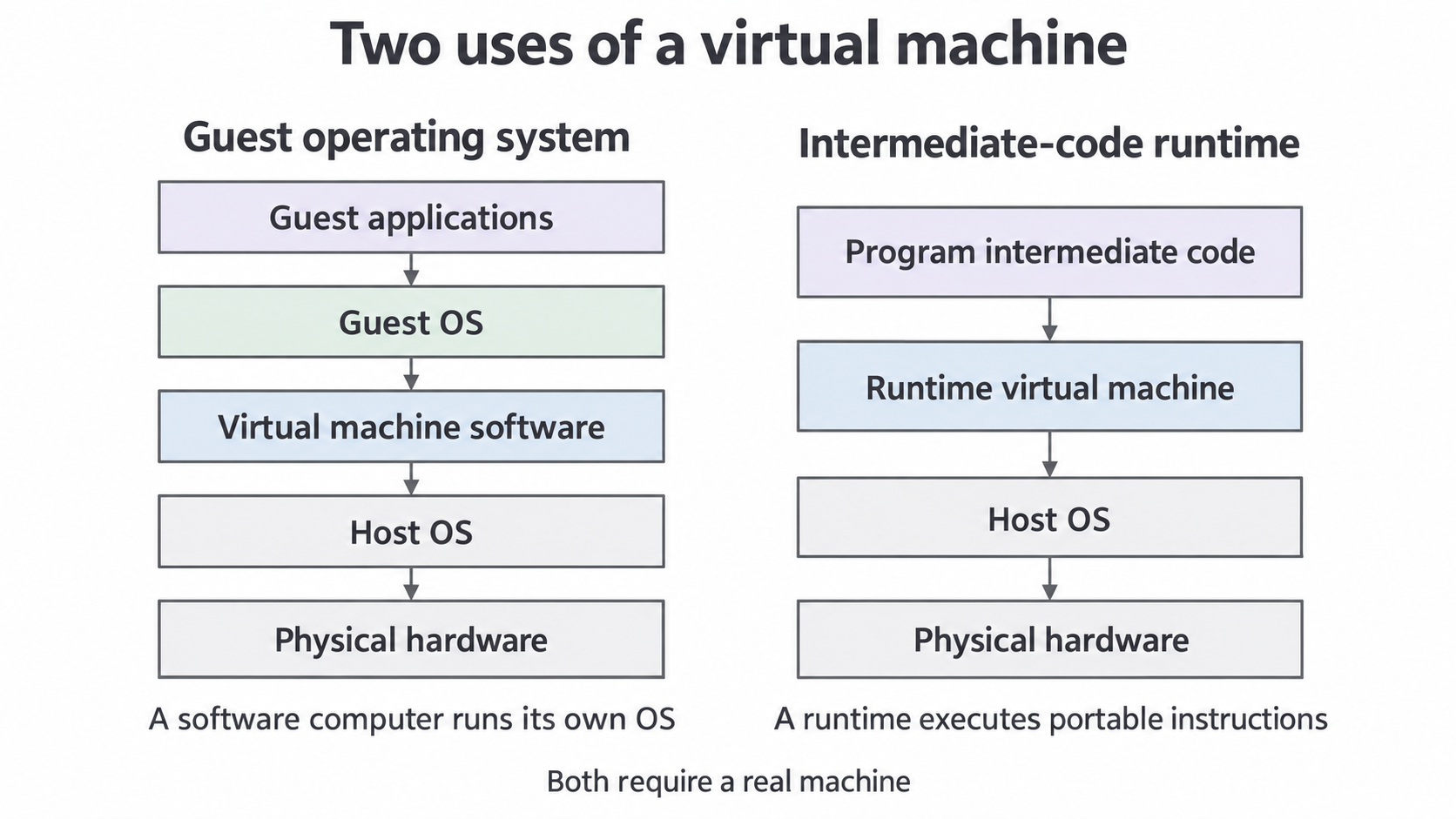
For example, a developer can test software in a guest OS without replacing the host's usual OS. A VM can also encapsulate a test environment, and snapshots can help restore an earlier state where supported. Isolation can limit the effect of a guest failure on another environment, but it is not a guarantee against all faults, malware or configuration mistakes.
The host and guests share physical CPU time, RAM and storage. Several guests with demanding workloads can compete and slow one another. Virtualisation adds management overhead and some hardware access may be limited. A VM does not supply extra physical RAM merely because it displays a large logical allocation; the underlying system must support that use.
Choosing a VM for OS testing is justified by the need for a separate machine environment and easy recovery, with the resource cost acknowledged. An intermediate-code runtime alone would not provide the developer with a complete different guest OS.
Executing intermediate code
A runtime virtual machine can execute intermediate code generated from a high-level source program. The intermediate instructions target the VM's defined instruction set rather than one particular physical processor's native instruction set. A compatible VM implementation then interprets them or compiles them to native instructions while the program runs.
The pipeline is high-level source → compiler → intermediate code → compatible runtime VM → execution on real hardware. This VM performs the role of an abstract execution machine. It does not necessarily boot a guest OS or simulate an entire computer's peripherals. The diagram's right-hand stack shows that distinct role.
Portability follows from a condition: the destination must have a compatible runtime and the facilities the program requires. The same intermediate code can then run through implementations for different platforms without recompiling it separately to each physical processor's native instructions. “Runs on absolutely any computer” ignores the compatibility and dependency requirements.
The runtime may also provide services such as checking, memory management or controlled execution. Interpretation and runtime compilation can add startup or execution overhead; optimisation can reduce that overhead, so it is inaccurate to assert that every VM program is always slower by a fixed amount. Distribution also depends on users having the required runtime version.
Compare the two VM roles by the software they execute. The hosted system VM supports a guest OS and its applications through a virtual computer. The intermediate-code VM executes a program's abstract instructions through a compatible runtime. Both hide aspects of the physical machine; both remain limited by actual hardware resources.