1.3.3 - Internet structure, protocols and switching
A web request can cross several networks while the browser treats it as one conversation. This lesson explains how shared rules, addresses and layers make that possible, and why sharing a route in packets has different consequences from reserving a circuit.
Networks and shared rules
A network connects devices so they can communicate and share resources, such as files, a printer or an Internet connection. A connection might use copper cable, fibre or radio. The connection alone is insufficient: devices must agree how to represent, address and interpret the data.
A protocol is a set of rules for communication. Rules can specify message format, who sends next, addressing, error detection and what happens when a response does not arrive. A standard is an agreed specification that enables compatible implementations. Standards can describe hardware interfaces and encodings as well as protocols. Two companies can build different network cards that communicate because both implement the same relevant standard.
Imagine a temperature sensor sending the bytes 2 and 0 to a monitoring computer. Without an agreed format, the receiver cannot know whether that means 20 degrees, two separate readings or a device identifier. Agreeing a format and units solves interpretation; agreeing acknowledgements and timeouts solves a different problem, detecting unsuccessful transfer. “Both use a cable” solves neither.
A LAN, or local area network, connects devices within a limited area such as a school site, usually under one organisation's control. A WAN, or wide area network, connects devices or LANs over a wider geographical area, often using communication providers' infrastructure. Distance is useful context, but a LAN is not defined by a fixed number of computers. A school can have hundreds of devices in its LAN; its connection to a remote branch crosses a WAN.
The Internet is a network of interconnected networks. Providers exchange traffic through routers and interconnections; there is no single central computer through which every message passes. The Web is one service using this infrastructure. Email and other applications also use the Internet.
The four TCP/IP layers
Layering divides communication into jobs with defined interfaces. An application can ask for data delivery without implementing the details of a wireless radio. Each layer uses the services of the layer below and provides services to the layer above.
| Layer | Main responsibility | Example in a web transfer |
|---|---|---|
| Application | Rules and message formats for an application service | HTTP defines requests and responses; DNS provides name lookup |
| Transport | Communication between applications on end devices | TCP uses ports, ordering, acknowledgements and retransmission for reliable delivery |
| Internet | Addressing and routing between networks | IP supplies source/destination addresses; routers choose a next hop |
| Link, also called network access | Transfer over the current local connection | Ethernet or Wi-Fi carries a frame to a device on the current link |
These are the four-layer TCP/IP model, not the seven-layer OSI model. A protocol name is not a layer name. For example, TCP is a transport protocol; “transport” describes a job.
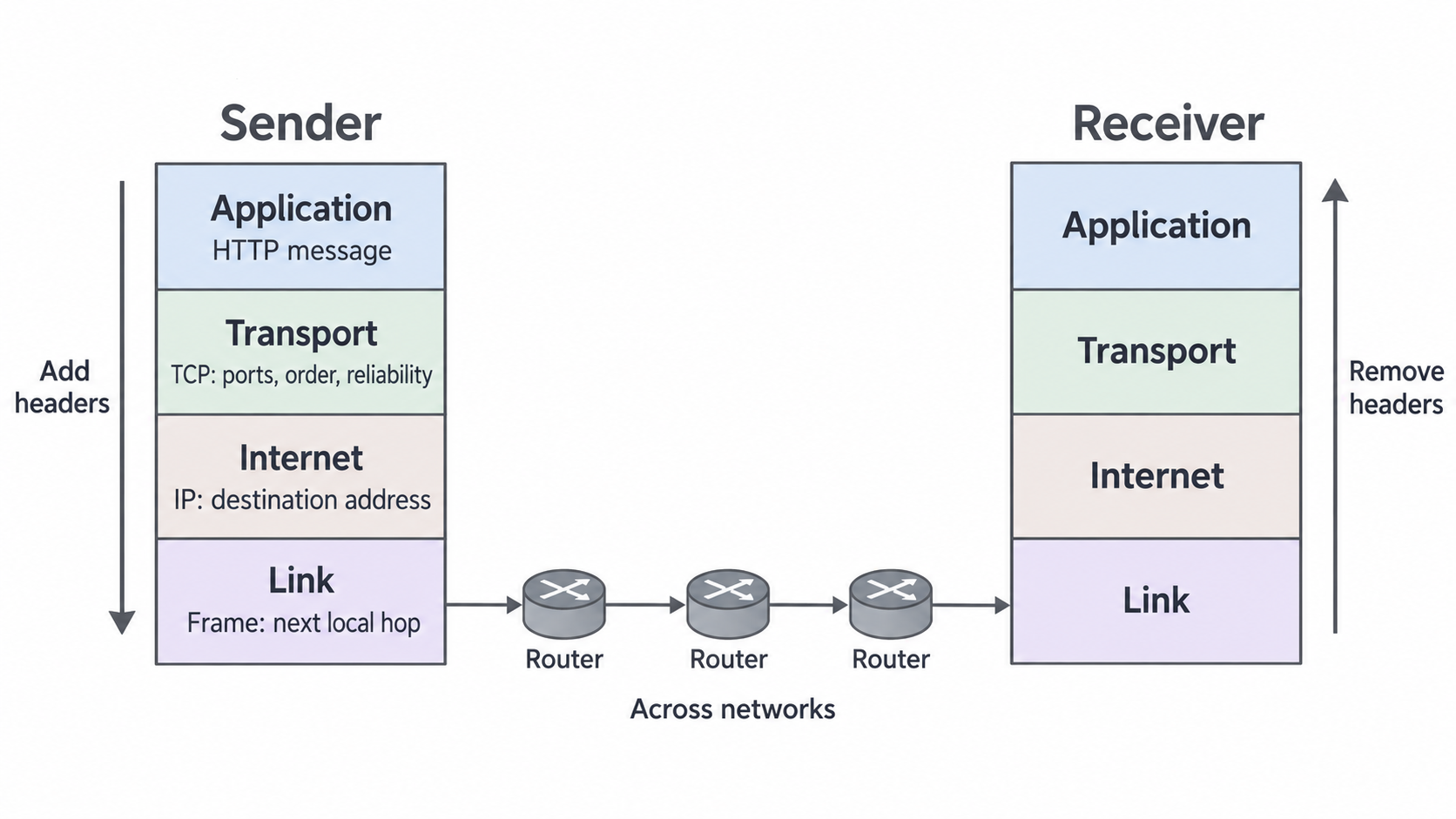
In a simplified TCP transfer, the application produces data. TCP divides the byte stream into segments and adds transport information, including ports and sequence information. IP encloses this in a packet with IP addressing information. The link layer encloses the packet in a frame for the current connection. Adding this surrounding information is encapsulation. The destination removes and interprets the relevant information as the data moves back up its stack. At an intermediate router, the incoming local frame is removed and the IP packet is forwarded in a new frame for the next link. Routers use the Internet-layer destination to make routing decisions; they do not reconstruct the browser's entire page.
[DIAGRAM: Endpoint encapsulation and decapsulation across routed networks; asset_slug: tcp-ip-journey; caption: Endpoint data moves down the sender's stack and up the receiver's stack. Intermediate routers forward IP packets across successive links.]
TCP reliability should not be confused with IP routing. IP provides best-effort delivery: a packet can be lost or arrive out of order. TCP can detect missing data using sequence information and acknowledgements and arrange retransmission. UDP is an alternative transport protocol with less delivery machinery; it does not itself provide TCP's ordered, reliable stream. An application using UDP must tolerate loss or supply its own appropriate handling. HTTP, DNS, TCP, IP and Ethernet illustrate the jobs; a named protocol's complete technical specification is not a memorisation target here.
Layering also makes change manageable. Replacing Ethernet with Wi-Fi can leave an application's request format unchanged because the link-layer interface still carries the packet. A developer can investigate a name-lookup failure separately from a broken cable. This independence depends on preserving agreed interfaces; arbitrary changes to what a layer promises can still affect other layers.
Finding an address and choosing a route
A domain name is a human-readable name; an IP address identifies a network interface for Internet-layer delivery. A URL can also contain a scheme, port, path and other information. DNS looks up the hostname, not the whole path of a URL.
Continue this lesson.
You’re previewing NovaLearn without an account. Create a free account to read the rest.
Create free account