3.1.2 - Secondary storage
Switch a computer off and its saved work should not vanish. In this lesson, you will explain the role of secondary storage, describe how magnetic, optical and solid-state technologies hold data, and choose a suitable type from evidence rather than labels.
The role of secondary storage
Imagine saving a presentation, switching the laptop off overnight and opening the same file the next morning. The file needs somewhere to remain while the computer has no power. Providing that persistent place for programs and data is the role of secondary storage.
Secondary storage
Non-volatile storage used to retain programs and data for later use, including when the computer is powered off.
Non-volatile means that stored data persists when power is removed. It does not mean that the data can never change: a file on a writable storage device can still be overwritten or deleted.
Secondary storage can hold:
- an operating system;
- installed applications;
- user data such as documents, images, audio and video.
The word secondary describes the storage's role, not its location. An SSD fitted inside a laptop and a removable USB flash drive are both secondary storage. Therefore, secondary does not mean external or removable.
Worked example
A learner saves the file history-notes.odt to the laptop's internal SSD and then shuts down.
- The SSD is secondary storage even though it is inside the laptop.
- Its flash memory is non-volatile, so the saved file persists without continuous power.
- The learner can retrieve that saved file during a later session.
The defining idea is persistence: secondary storage retains saved programs and data when power is removed.
That relationship lets you explain both the role of the storage and what happens to a particular saved file.
Magnetic storage
The three named technologies differ in the physical property used to represent data. The diagram gives an overview; the explanation below makes each mechanism precise.
[DIAGRAM: asset_name: Three ways to store data; asset_slug: 3_1_2_secondary_storage__diagram_01; recommended_method: image_gen; description: A monochrome three-panel conceptual diagram comparing magnetic, optical and solid-state secondary storage. The magnetic panel shows magnetised regions on a spinning HDD platter and a moving read/write head above the surface. The optical panel shows a laser directed at an optical disc and different reflected-light paths returning to a detector. The solid-state panel shows flash-memory cells holding electrical charge, controlled by electrical signals, with no moving parts. The panels show mechanisms rather than assigning any single pictured region directly to a literal binary 0 or 1.]
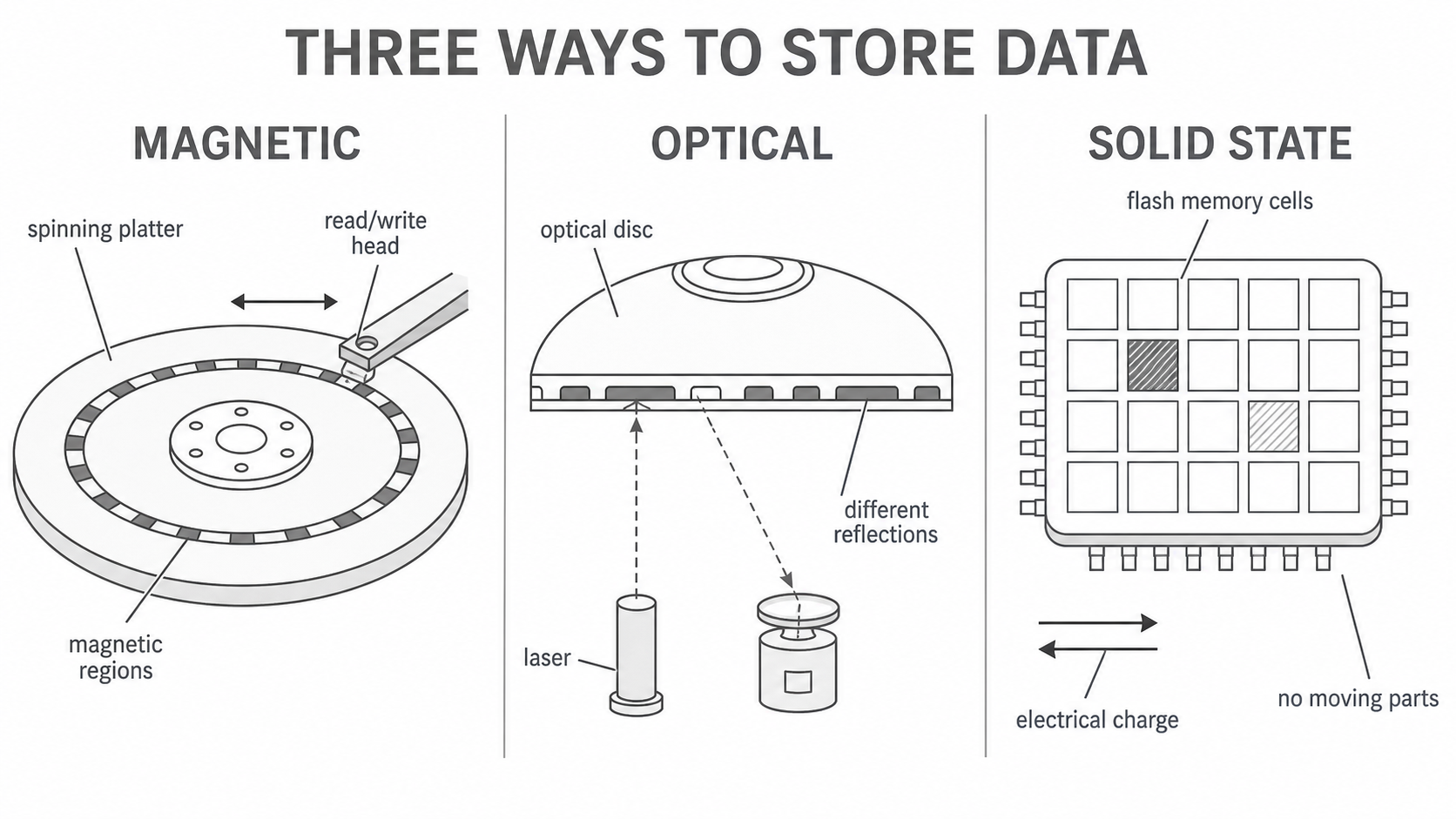
Magnetic storage
Storage that represents data using the magnetic states of tiny regions on a magnetically coated medium.
In a hard disk drive (HDD), the medium is one or more rigid, circular platters:
- A motor spins the platter.
- An actuator moves a read/write head to the required track.
- To write data, the head changes the magnetisation of tiny regions on the platter.
- To read data, the head detects the magnetic pattern and the drive interprets that pattern as binary data.
The head operates extremely close to the platter; it should not scrape across the surface. The mechanical movement needed to rotate the platter and position the head contributes to access delay and makes an HDD more vulnerable to a knock while operating than storage with no moving parts.
Magnetic tape uses the same general principle on a long, coated strip that moves past a read/write head. This matters because magnetic does not always mean spinning platter: magnetised regions are the shared feature.
Worked classification
A round HDD is not optical just because its platter looks like a disc. It is magnetic because the surface stores a pattern of magnetised regions and a magnetic head writes and senses that pattern. Classification depends on the storage mechanism, not the outer shape.
Optical storage
Optical storage
Storage that uses laser light to store or retrieve data from optical media.
CDs, DVDs and Blu-ray discs are common optical media. Their data tracks contain a pattern of areas with different optical properties. To read a disc:
- the drive spins the disc and focuses a laser onto the data track;
- different areas return different amounts or patterns of reflected light;
- a light sensor detects those differences;
- the drive decodes the detected pattern as binary data.
On a manufactured read-only disc, microscopic pits and lands create the optical pattern. Recordable and rewritable discs use a laser to alter a recording layer so that its optical properties differ. It is therefore safer to say that the laser detects a pattern of reflection changes than to claim that every pit is simply a 0 and every land is simply a 1.
Continue this lesson.
You’re previewing NovaLearn without an account. Create a free account to read the rest.
Create free account