2.3.2 - Lossy and lossless compression
A smaller file is easier to store and send, but making it smaller can involve an important choice: must every original bit be recoverable? This lesson will help you explain why compression is needed, distinguish lossless from lossy compression, and choose the suitable method for a given purpose.
Why compress data
A school learning app stores hundreds of audio recordings. The recordings must fit on the school's storage and reach students over a network. Large files make both jobs harder because more data must be stored and transmitted.
Compression
Compression is the use of an algorithm to reduce the size of a file.
Compression changes how the data is represented so that fewer bits or bytes are needed. It does not simply delete the whole file. Software can later decompress the file into a usable form, although what can be recovered depends on the compression method.
There are two main reasons for reducing a file's size:
| Need | Cause and consequence |
|---|---|
| Storage | A smaller file uses less storage capacity, so more files can fit on the same device or server. |
| Transmission | A smaller file contains fewer bits to send. At the same transfer rate, it takes less time to upload or download; it also needs less bandwidth to be sent in the same time. |
Worked example: The school compresses each recording before making it available. Each recording now occupies less storage, so the server can hold more recordings. Fewer bits also travel across the network for each download, so the download takes less time if the transfer rate stays the same.
Notice the link in each explanation: smaller file -> less data to store or send -> practical benefit. Saying only "it saves space" gives the benefit, but not the reason.
Compression is needed when reducing the amount of data makes storage or transmission more practical.
The download case below needs both the reduction in data and its consequence.
Exact or approximate recovery
The key difference between the two methods is what happens after compression and decompression.
Lossless compression
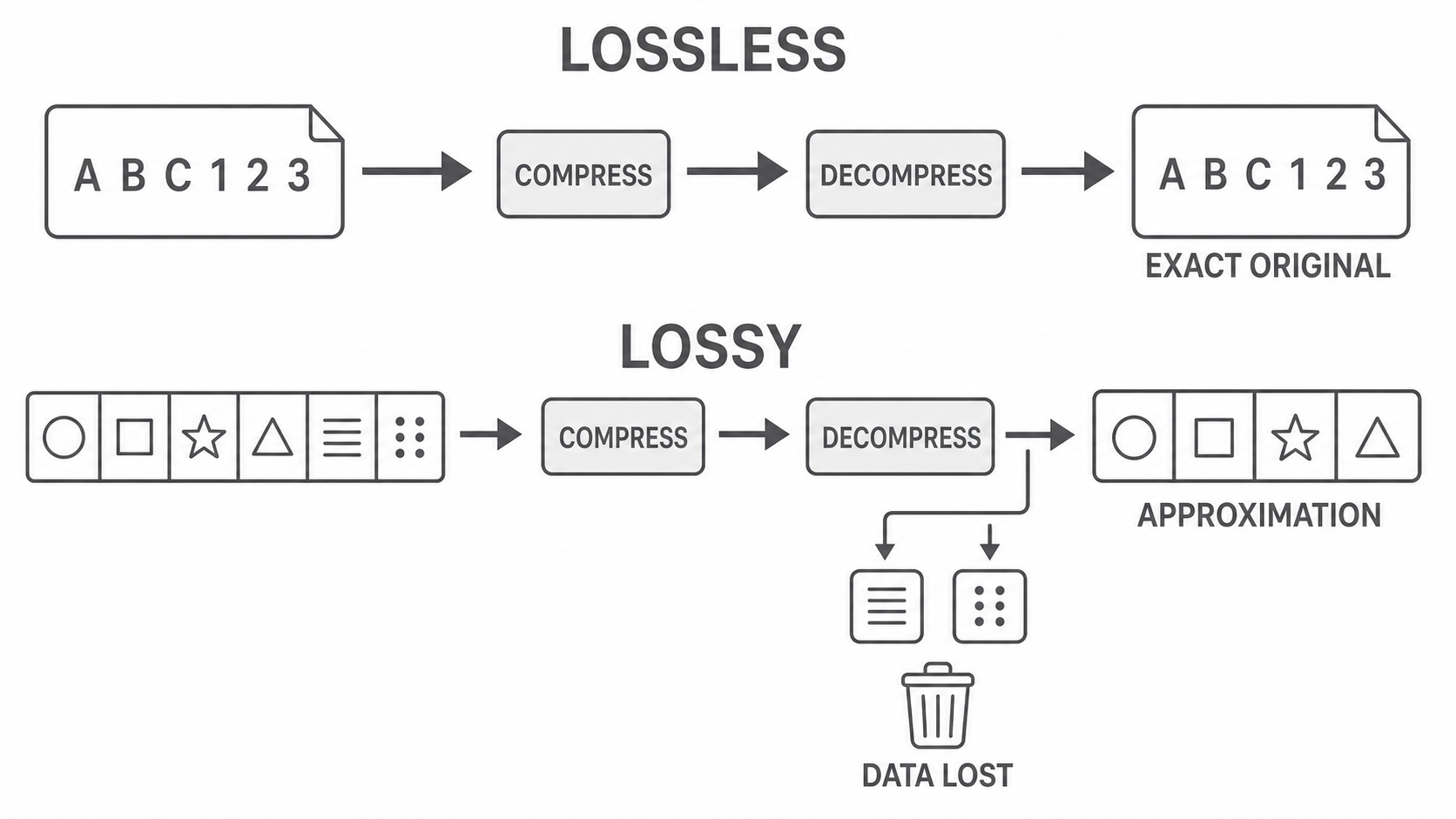
Lossless compression reduces file size without permanently losing any original data, so decompression can reconstruct the original file exactly.
This is a reversible process: the representation becomes smaller, but no part of the original information is irretrievable.
Lossy compression
Lossy compression reduces file size by permanently discarding some original data, so decompression cannot reconstruct the exact original file.
[DIAGRAM: asset_name: Reversible and irreversible compression pathways; asset_slug: 2_3_2_lossy_and_lossless_compression__diagram_01; recommended_method: image_gen; description: A monochrome side-by-side flow. Lossless path: original data A B C 1 2 3 passes through COMPRESSION to a smaller package and then DECOMPRESSION, returning exact A B C 1 2 3, labelled exact original restored. Lossy path: an original media strip with six distinct detail marks passes through COMPRESSION to a smaller package and then DECOMPRESSION, returning a simplified strip with only four marks, while two discarded marks end at a one-way removed-data symbol, labelled approximation only and discarded data cannot return. Arrows must clearly show left-to-right sequence and no arrow may return discarded data to the output.]
| Property | Lossless | Lossy |
|---|---|---|
| Is original data permanently discarded? | No | Yes, some data is discarded |
| Result after decompression | Exact copy of the original | Approximation of the original |
| Reversible? | Yes | No |
| Possible effect | All original detail is preserved | Quality may be reduced |
Lossless does not mean that no compression happened: the file is smaller, but enough information remains to rebuild every original bit. Lossy does not mean the entire file disappears or becomes unusable: some detail is removed, and the remaining data still represents the content. The lost detail may be hard to notice, but it cannot be recovered.
Lossy compression can often make a file smaller than lossless compression because it is allowed to discard data. That is a trade-off, not a guarantee of a particular file size.
Worked example: A file contains the record Invoice total: 1800. Every character and digit affects its meaning. Lossless compression can reconstruct that exact record after decompression. Lossy compression would be unsuitable because any permanently discarded or changed data could make the record inaccurate.
Continue this lesson.
You’re previewing NovaLearn without an account. Create a free account to read the rest.
Create free account